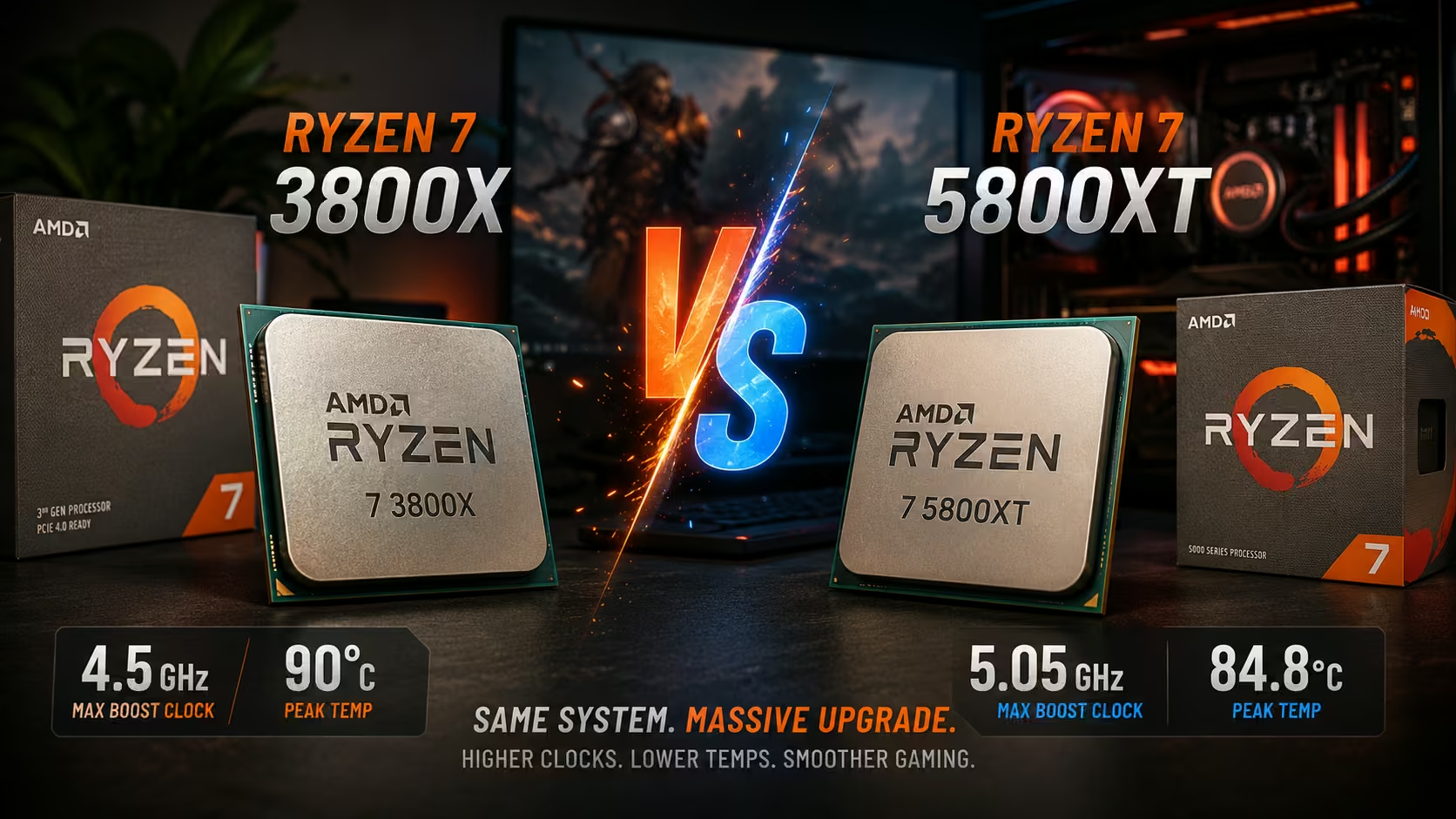
Why the Ryzen 7 5800XT Still Matters in 2026
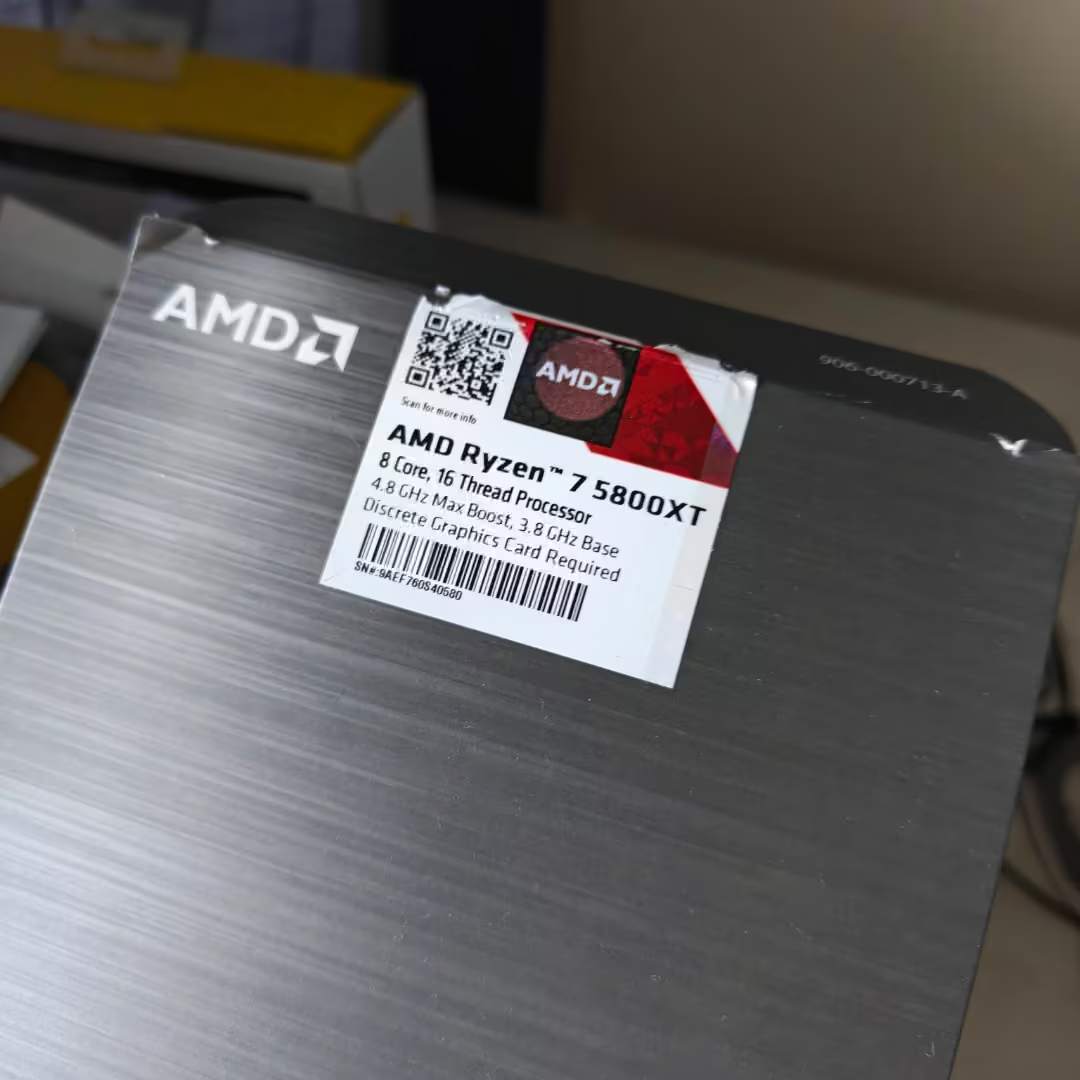
The Ryzen 7 5800XT has quietly become one of the most compelling processors for gamers who remain on the AM4 platform. As motherboard and memory prices continue to rise for newer platforms, many enthusiasts are discovering that a simple CPU upgrade can deliver remarkable gains without requiring a complete system rebuild.
When I upgraded from a Ryzen 7 3800X, the immediate improvement in boost behaviour, gaming responsiveness, and frame consistency was obvious. However, achieving the processor’s full potential required far more than simply installing the chip.
Modern motherboard firmware often applies aggressive automatic voltage profiles that prioritize benchmark scores over efficiency. While this may produce impressive marketing numbers, it frequently results in excessive temperatures, unnecessary power draw, and premature thermal throttling.
The goal was simple: unlock higher clocks, reduce temperatures, and create a cleaner gaming pipeline from hardware to software.

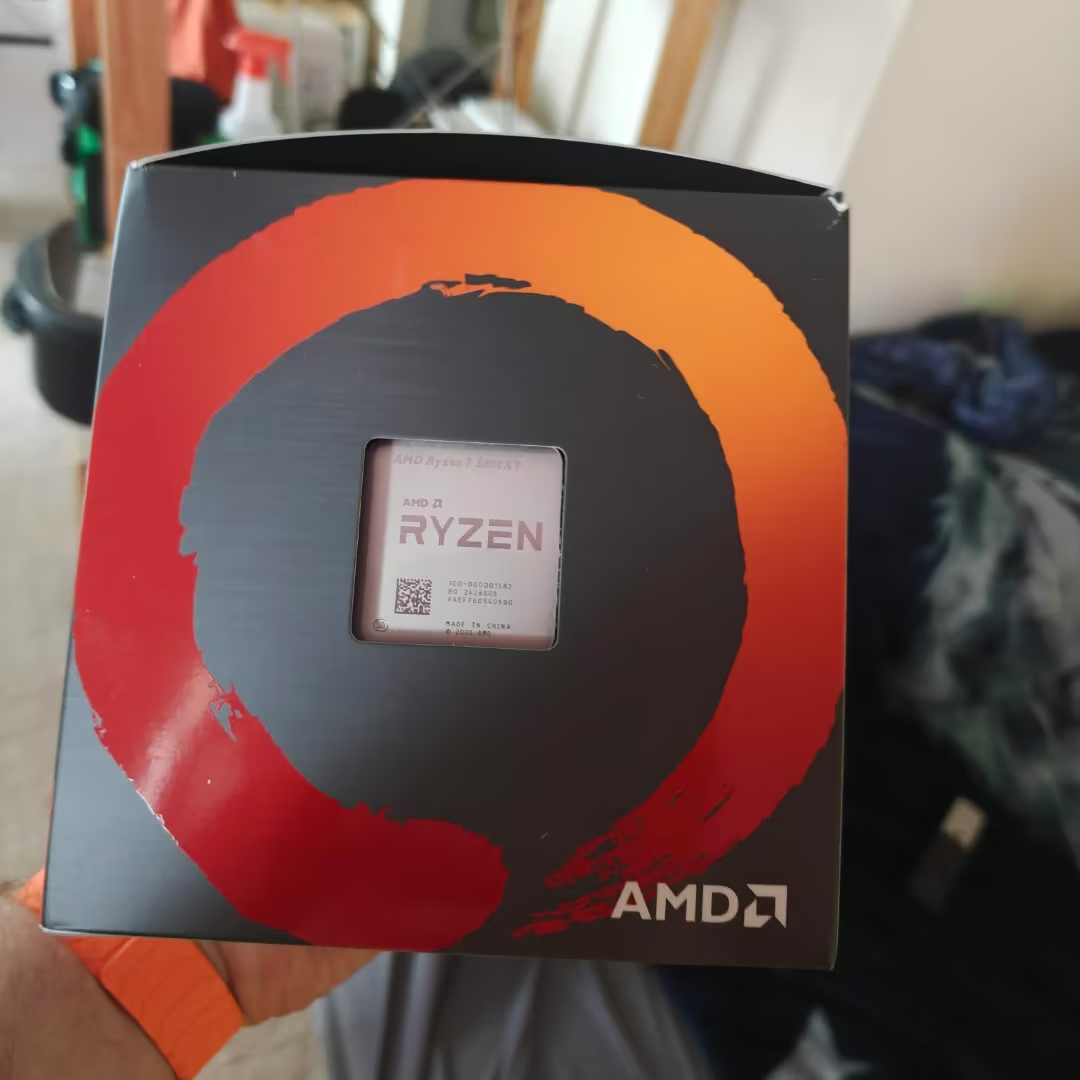
Side-by-Side Comparison: Stock 3800X vs. Tuned 5800XT
| Specification / Parameter | AMD Ryzen 7 3800X (Stock Baseline) | AMD Ryzen 7 5800XT (Custom Tuned) |
| Architecture | Zen 2 (Matisse) | Zen 3 (Vermeer) |
| Cores / Threads | 8 / 16 | 8 / 16 |
| Base Clock | 3.9 GHz | 3.9 GHz (via +100 MHz Override) |
| Max Boost Clock | 4.5 GHz | 5.05 GHz (via +250 MHz Override) |
| L3 Cache Topology | 32 MB (Split: 2x 16 MB CCX Layout) | 32 MB (Unified Single-CCX Pool) |
| Power Target Management | 105W TDP / 142W Auto PPT Default | 125W PPT / 85A TDC / 125A EDC (Clamped) |
| Voltage Configuration | Factory Automated Stock Voltage Curve | Negative 25 Global Offset (Curve Optimizer) |
| Peak Operating Temp | Stock Varied Scaling (Up to 95°C limit) | 84.8°C Core / 81.1°C Package (Sustained) |
While the official specifications suggest only incremental clock improvements, the real advantage comes from Zen 3’s IPC gains, improved cache behaviour, and more aggressive boost characteristics, in my case, the optimized 5800XT was sustaining peaks of 5.05 GHz while maintaining lower operating temperatures than expected.
Why I Chose the Ryzen 7 5800XT Over AM5
At roughly $300, the 5800XT represented a far more practical upgrade than replacing the motherboard, memory, and processor simultaneously. For existing AM4 users with quality DDR4 memory and a capable motherboard, the processor offers a straightforward path to modern gaming performance without the cost of a complete platform migration.
Having spent years working as a systems administrator and building everything from gaming desktops to servers, I approached the upgrade differently than a typical overclocking project. The goal wasn’t to chase screenshots or benchmark records. It was to build a stable, efficient gaming platform that could sustain high clocks without excessive voltage or thermal throttling.


Building the Foundation for Maximum Performance
Understanding PPT, TDC, and EDC Limits
The first stage involved abandoning automatic Precision Boost Overdrive profiles and establishing manual power limits.
The configuration used was:
| Setting | Value |
| PPT | 125W |
| TDC | 85A |
| EDC | 125A |
These limits prevent motherboard firmware from aggressively overfeeding the CPU with voltage and current. Instead of chasing unsustainable boosts, the processor operates within predictable electrical boundaries. The priority was to clamp down on the raw power parameters in the UEFI to stop the motherboard from over-provisioning voltage. I bypassed the automated Precision Boost Overdrive (PBO) profiles and established explicit manual constraints:
Package Power Tracking (PPT): 125W
Thermal Design Current (TDC): 85A
Electrical Design Current (EDC): 125A
Curve Optimizer Undervolting Explained
Why a Negative 25 Offset Works
One of the most powerful features of Zen 3 architecture is AMD’s Curve Optimizer.
After extensive stress testing under heavy workloads and transitional idle states, a global Negative 25 Curve Optimizer value proved completely stable.
The benefits were immediate:
- Lower operating voltage
- Reduced heat generation
- Improved boost sustainability
- Increased efficiency
- Additional thermal headroom
One common sign of an overly aggressive undervolt is instability during low-load transitions or idle periods. In my case, the Negative 25 profile remained stable throughout testing and daily use. Temperatures dropped immediately, boost clocks stayed higher for longer, and I never ran into the random idle reboots that usually signal an unstable undervolt.
Breaking the 5 GHz Barrier
ASUS BIOS Adjustments That Matter
Achieving stable clocks above 5 GHz required several critical BIOS modifications.
First, ASUS Performance Enhancement was disabled. This prevents motherboard-level voltage manipulation from interfering with manually tuned settings.
Second, SB Clock Spread Spectrum was disabled.
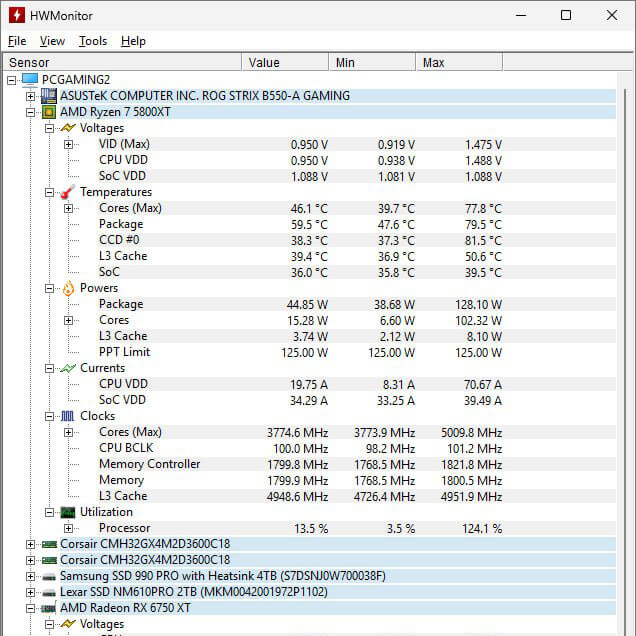
Many users overlook this setting, but leaving it enabled often causes the base clock to fluctuate below 100 MHz. By disabling it, the base clock remained locked at a clean 100.0 MHz.
Finally, Max CPU Boost Clock Override was set to:
+250 MHz
The result was impressive.
Monitoring software consistently reported peak frequencies of approximately:
5.05 GHz on the processor’s best-performing cores.
After several rounds of testing, I settled on 125W PPT, 85A TDC, and 125A EDC. Anything higher pushed temperatures up without giving me enough extra performance to justify it.
Thermal Management and Stability Validation
Performance means very little if temperatures spiral out of control.
After tuning, the processor remained comfortably below thermal throttling thresholds.
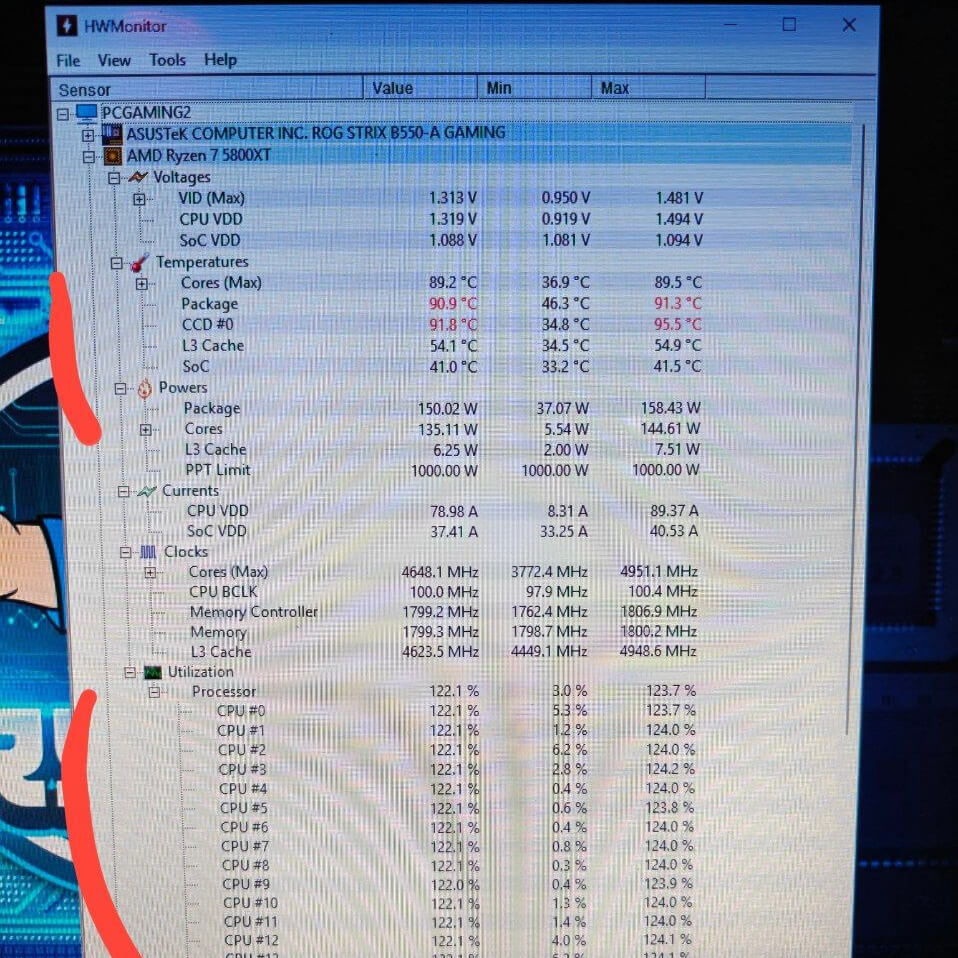
Peak measurements included:
| Metric | Temperature |
| Core Die Maximum | 84.8°C |
| Package Maximum | 81.1°C |
| Configuration State | Core Temperature | Package Temperature | Operational Status |
| Stock Baseline (Out-of-the-Box) | 90.0°C | 90.0°C | Thermal Throttling (TjMax Limit hit) |
| Custom Tuned (5.05 GHz Profile) | 84.8°C | 81.1°C | Stable (Sustained load headroom) |
Considering the frequency increase and sustained workloads, these temperatures demonstrate the effectiveness of combining manual power limits with Curve Optimizer undervolting.
The system was no longer fighting thermal throttling. Instead, it was operating efficiently within controlled limits.
Windows 11 25H2 Gaming Debloat Strategy
Removing Telemetry and Background Overhead
Hardware optimization is only half the battle.
Windows 11 25H2 introduces numerous background services, telemetry functions, and AI-driven components that consume resources even when gaming.
Using the Chris Titus Windows Utility, unnecessary background tasks were removed, including:
- Excess telemetry services
- Unused Microsoft applications
- AI-related background processes
- Redundant startup tasks
The result was a leaner operating system with reduced process counts and improved responsiveness.
Optimizing Windows Scheduling Behaviour
Several additional adjustments improved scheduling efficiency:
- Best Performance power plan enabled
- Game Mode activated
- Optimizations for Windowed Games enabled
- Background game recording disabled
- Unnecessary visual animations removed
I’ve spent enough time troubleshooting Windows systems to know that operating system overhead is often overlooked during gaming optimization. The hardware can be perfectly tuned, but excessive telemetry, background services, and unnecessary startup tasks still consume resources. Using the Chris Titus Windows Utility provided a quick way to remove the obvious offenders before making a handful of manual adjustments.
Related Posts

AMD Adrenalin Best Settings 2026
Anti-Lag and Input Latency Optimization
A properly configured driver stack is critical for consistent frame delivery.
Recommended global settings:
| Setting | Configuration |
| Radeon Anti-Lag | Enabled |
| Adaptive Sync | Enabled |
| Enhanced Sync | Disabled |
| Radeon Chill | Disabled |
| Radeon Boost | Disabled |
| V-Sync | Always Off |
This configuration minimizes unnecessary processing while maintaining smooth gameplay and low latency.
Texture Processing and Driver Efficiency
Additional optimizations included:
| Setting | Value |
| Texture Filtering Quality | Performance |
| Surface Format Optimization | Enabled |
| Tessellation Mode | AMD Optimized |
These adjustments reduce driver overhead without creating noticeable visual degradation.
Advanced Rendering Cleanup
Many gamers unknowingly introduce conflicts by forcing global graphical overrides.
Anisotropic Filtering was left disabled globally.
Modern DX12 and Vulkan engines manage texture filtering internally, making driver-level overrides unnecessary and potentially problematic.
Likewise, “Wait for Vertical Refresh” was set to:
Always Off
This prevents driver-level V-Sync interference and keeps frame delivery under the control of Adaptive Sync technology.
Adaptive Sync and Frame Pacing
Variable Refresh Rate technology works best when frame rates remain inside the monitor’s supported refresh window.
Adaptive Sync was enabled through AMD Adrenali,n while the following settings remained disabled:
- GPU Scaling
- Virtual Super Resolution
The display remained in native Full RGB 4:4:4 mode for maximum image clarity.
FRTC vs In-Game Frame Limiters
One frequently debated topic is whether to use in-game frame limiters or AMD’s Frame Rate Target Control (FRTC).
For this configuration:
FRTC = 141 FPS
on a 144 Hz display.
Benefits include:
- Consistent frame pacing
- Prevention of refresh-rate overshoot
- Reliable Variable Refresh Rate operation
- Reduced GPU power consumption
Even if a game lacks a robust frame limiter, FRTC acts as a dependable safeguard.
Real-World Gaming Results
After completing the optimization process, the improvements were measurable across the entire system.
Key outcomes included:
- Stable 5.05 GHz boost clocks
- Lower average temperatures
- Reduced power consumption
- Elimination of thermal throttling
- Smoother frame pacing
- Lower input latency
- Cleaner Windows environment
- More consistent gaming performance
Rather than chasing synthetic benchmark numbers, the system was optimized for what matters most: delivering smooth, responsive gameplay.
During testing in Assassin’s Creed Shadows and Cyberpunk 2077: Phantom Liberty, frame rates generally hovered between 120 and 140 FPS, with a practical ceiling of 144 Hz imposed by the display. More importantly, frame delivery remained consistent throughout extended gameplay sessions. There were no noticeable spikes, hitching events, screen tearing artifacts, or input latency issues. The combination of Adaptive Sync, FRTC, and tuned Adrenalin settings appeared to keep frame pacing exceptionally smooth.
Assassin’s Creed Shadows Benchmark Analysis
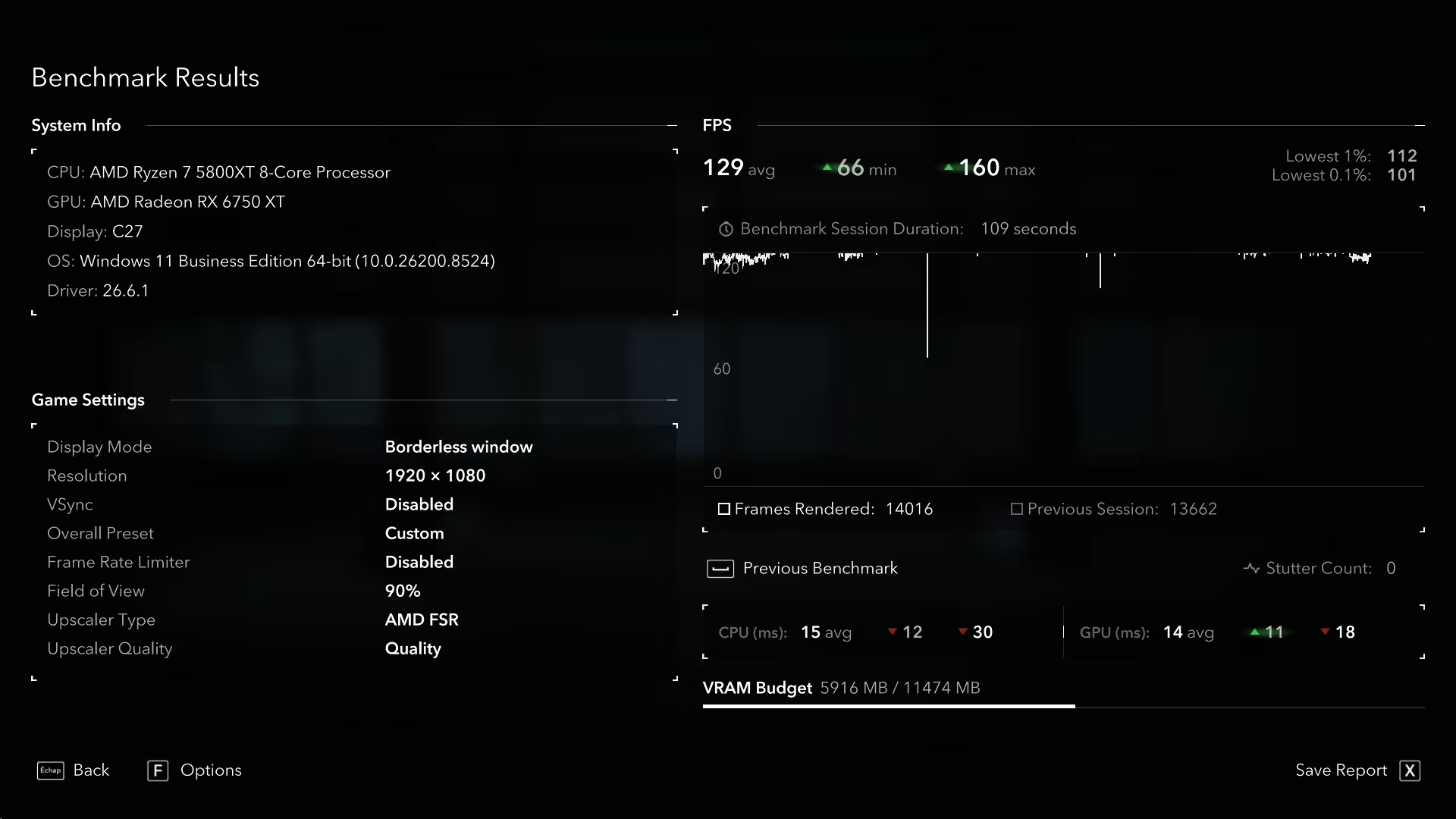
The in-game benchmark from Assassin’s Creed Shadows paints a clear picture of how the tuned Ryzen 7 5800XT performs in a demanding open-world environment. Running at 1920×1080 with AMD FSR Quality mode enabled, the system delivered an average frame rate of 129 FPS, with peaks reaching 160 FPS and a recorded minimum of 66 FPS.
More importantly, the consistency metrics tell an even better story. The 1% low of 112 FPS and 0.1% low of 101 FPS indicate that frame delivery remained stable throughout the benchmark sequence. While average FPS numbers often attract the most attention, 1% lows are frequently the better indicator of real-world gameplay smoothness because they reveal how well the system handles demanding scenes, asset streaming, and rapid transitions.
The benchmark also reported a stutter count of zero, which aligns with my gameplay experience. During testing, there were no noticeable hitching events, frame pacing issues, or sudden drops that would negatively impact responsiveness. Combined with the Adaptive Sync and Frame Rate Target Control settings configured through AMD Adrenalin, the overall experience felt exceptionally smooth.
From a hardware utilization standpoint, the benchmark recorded an average CPU frame time of 15 ms and GPU frame time of 14 ms, suggesting a balanced workload between the Ryzen 7 5800XT and Radeon RX 6750 XT. Neither component appeared to be creating a significant bottleneck under these settings.
Considering the processor was operating with manual PBO limits, a Negative 25 Curve Optimizer offset, and a sustained boost profile exceeding 5 GHz, these results demonstrate that reducing temperatures and power overhead does not necessarily come at the expense of gaming performance. In fact, the combination of lower thermals, improved boost behaviour, and stable frame delivery produced exactly the outcome I was aiming for: smooth, responsive gameplay with enough headroom to fully utilize a 144 Hz display.
Cyberpunk 2077: Phantom Liberty Settings Analysis and Benchmark Results
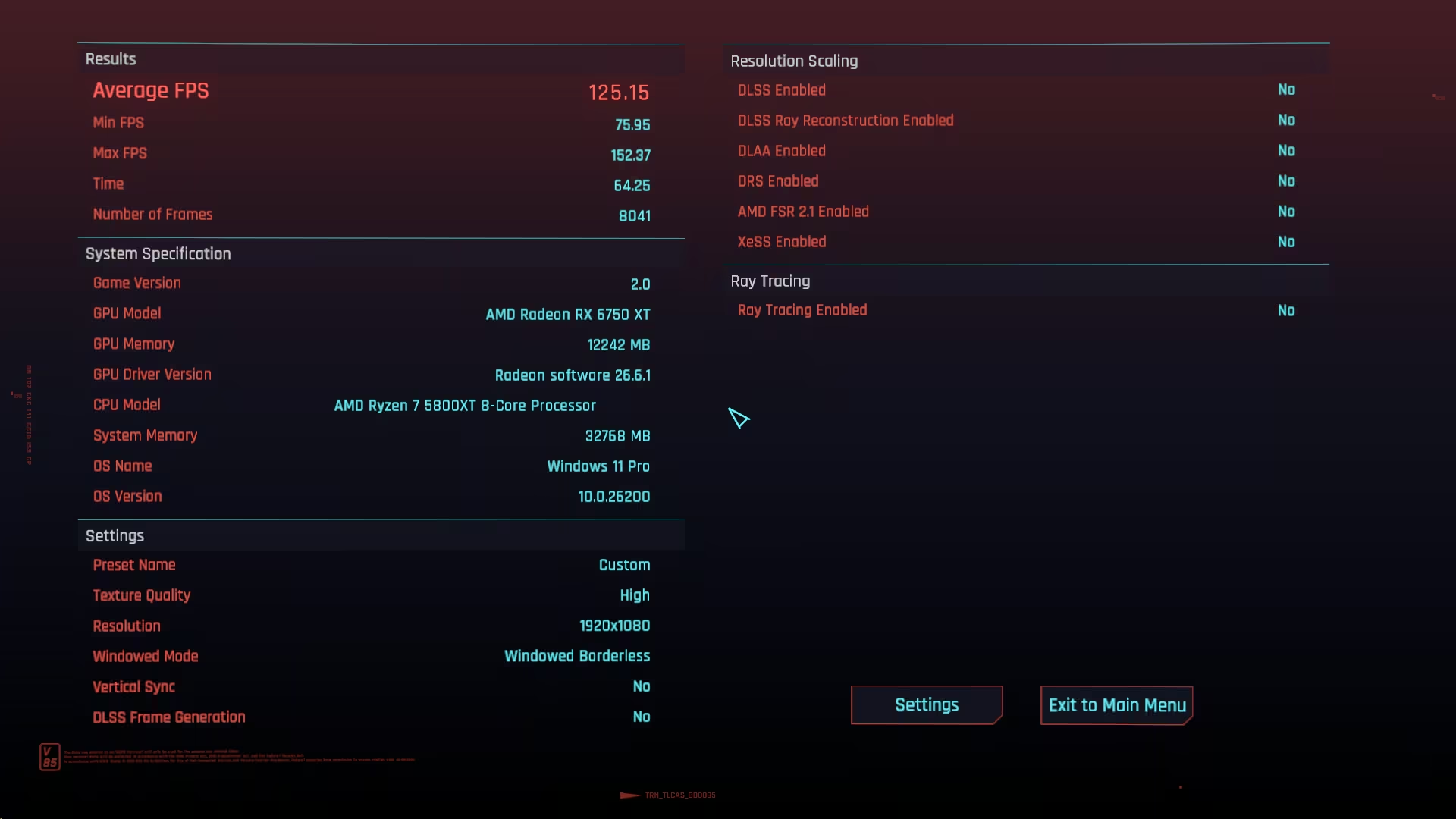
Cyberpunk 2077 remains one of the most demanding games available on PC, particularly after the extensive engine updates introduced in Version 2.0 and the Phantom Liberty expansion. Rather than relying on upscaling technologies or aggressive visual compromises, I built a custom graphics profile focused on delivering the cleanest possible image while maintaining consistently high frame rates.
The game was rendered at a native resolution of 1920×1080 with all resolution scaling technologies disabled, including AMD FidelityFX Super Resolution (FSR), Intel XeSS, and Dynamic Resolution Scaling. Ray tracing was also disabled, allowing the Radeon RX 6750 XT and Ryzen 7 5800XT to focus entirely on rasterized performance without the significant overhead associated with real-time ray-traced lighting.
Several visual effects that often introduce blur or image distortion were disabled, including Motion Blur, Film Grain, Chromatic Aberration, Lens Flare, and Depth of Field. While these effects can create a more cinematic presentation, removing them results in a cleaner image, sharper motion clarity, and improved visibility during fast-paced gameplay.
To maintain strong frame pacing, Crowd Density was configured to Medium. This setting has a substantial impact on CPU scheduling in densely populated areas such as Dogtown, where large numbers of NPCs can generate significant processor overhead. By reducing crowd density slightly, the Ryzen 7 5800XT was able to maintain much more consistent frame times without sacrificing the overall atmosphere of Night City.
Other settings were carefully balanced to preserve image quality while avoiding unnecessary performance penalties. Screen Space Reflections remained at High, Texture Quality was set to High, and several shadow-related settings were reduced to Medium, providing a visual experience that still looks impressive without overwhelming the GPU.
The benchmark results reflected this balance perfectly. The system achieved an average frame rate of 125.15 FPS, with a minimum frame rate of 75.95 FPS and a peak of 152.37 FPS. More importantly, the minimum frame rate remained well above 60 FPS throughout the benchmark run, indicating stable frame delivery and excellent frame-time consistency. This is particularly important in Cyberpunk 2077, where sudden asset streaming events and dense urban environments can expose weaknesses in both CPU and GPU performance.
One additional optimization worth considering is lowering Volumetric Fog Resolution from High to Medium. During testing, this setting proved to be one of the most demanding non-ray-traced effects in the game. Reducing it can provide an additional performance gain while producing only a minor visual difference that is virtually impossible to notice during normal gameplay. Likewise, enabling Contact Shadows and increasing Anisotropic Filtering to 16x can improve environmental realism and texture clarity with little to no measurable performance cost.
Taken together, these settings created one of the smoothest experiences I encountered during testing. Combined with the Ryzen 7 5800XT tuning profile, AMD Adrenalin optimizations, Adaptive Sync, and a 141 FPS frame cap, Cyberpunk 2077: Phantom Liberty maintained excellent responsiveness, stable frame pacing, and visual quality that fully justified the upgrade from the Ryzen 7 3800X.
Hogwarts Legacy Performance on the Ryzen 7 5800XT: Optimized Settings and Smooth Gameplay
To further validate the Ryzen 7 5800XT tuning profile, I spent time testing Hogwarts Legacy using a custom graphics configuration designed to balance visual quality and frame rate consistency. The game was configured at 1920×1080 resolution using a mix of High, Ultra, and Medium settings, with demanding options such as fog quality, shadows, and population density reduced slightly to maintain smooth performance during exploration and combat.
Visual effects, including motion blur, film grain, chromatic aberration, and depth of field, were disabled to improve image clarity and reduce unnecessary rendering overhead. V-Sync remained disabled while the frame rate was left uncapped, allowing AMD FreeSync and the system’s overall optimization profile to manage frame pacing more effectively.
The result was a consistently smooth gameplay experience with stable frame delivery throughout Hogwarts Castle, Hogsmeade, and the surrounding open-world areas. Similar to my experience in Assassin’s Creed Shadows and Cyberpunk 2077: Phantom Liberty, the optimized Ryzen 7 5800XT maintained strong responsiveness, low input latency, and enough performance headroom to fully take advantage of a 144 Hz gaming display.
The Ryzen 7 5800XT makes the most sense for:
- Existing AM4 users are looking for one final platform upgrade.
- Gamers who already own quality DDR4 memory and a capable motherboard.
- Users who want stronger gaming performance without rebuilding their entire system.
Frequently Asked Questions
- Is the Ryzen 7 5800XT still worth buying in 2026?
Yes. For existing AM4 users, it remains one of the best drop-in upgrades available without replacing the motherboard or memory.
- What is the best Curve Optimizer setting for a 5800XT?
Every chip is different, but a Negative 25 offset often provides an excellent balance between stability and efficiency.
- Does undervolting reduce gaming performance?
No. Proper undervolting often improves performance by reducing temperatures and allowing higher sustained boost frequencies.
- Should AMD Enhanced Sync be enabled?
For many systems, disabling Enhanced Sync results in more consistent frame pacing and fewer micro-stutters.
- Is Windows 11 debloating safe?
When performed carefully using trusted tools and documented methods, it can reduce background overhead and improve responsiveness.
- Why cap FPS at 141 on a 144 Hz monitor?
Maintaining frame rates slightly below maximum refresh helps keep Adaptive Sync active and minimizes latency spikes.
In The End
Unlike many CPU tuning projects that rely on trial and error, this upgrade was largely predictable. Years of working with desktop systems, laptops, and server hardware provided a clear roadmap for which settings would produce measurable gains without compromising stability. The objective wasn’t to chase benchmark records—it was to create a balanced, low-latency gaming platform that remained thermally controlled under sustained load.
The Ryzen 7 5800XT proves that intelligent optimization often delivers greater gains than expensive hardware upgrades. By combining manual PBO limits, a stable Curve Optimizer undervolt, strategic BIOS adjustments, Windows 11 25H2 debloating, and carefully selected AMD Adrenalin settings, it is possible to create a highly efficient gaming platform that exceeds 5 GHz while remaining cool, responsive, and stable.
For enthusiasts seeking smoother frame pacing, lower input latency, and improved thermal efficiency, this hardware-to-software blueprint demonstrates exactly how a mature AM4 platform can continue to compete in 2026 and beyond.