Save pictures from Instagram on Android

Martin Guay
Martin Guay - Chief Editor
1 Min Read
Ever wondered why you can’t save pictures on Instagram? Has this been an annoyance for you? While this can be true for many people, there’s an app that will save pictures from Instagram on Android that you can get directly from the Play store. Want to know what it is? Follow me!


Save pictures from instagram on android | br hr | review by cryovex

Shopping Gallery

Instagram picture saver instasaver cryovex 2

How to use?

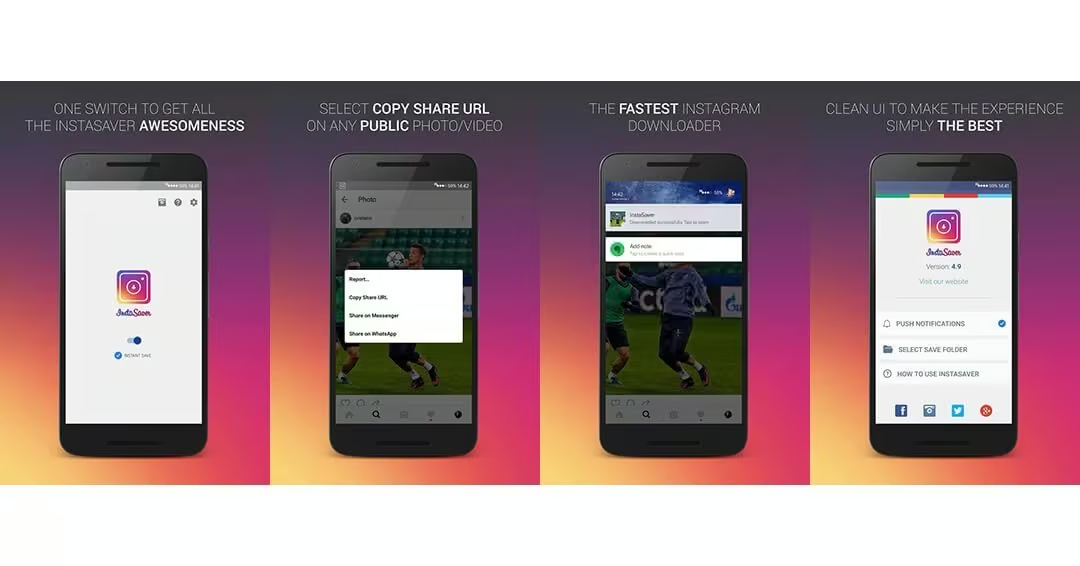
  1. Turn on InstaSaver by tapping on the main switch below the InstaSaver logo.
  2. Select Copy Share URL on any public photo or video, a notification will prompt up from which you can choose to download the photo/video or share it.

OR

- Advertisement -
Surfshark VPN app connected on smartphone promoting fast VPN for unlimited devicesSurfshark VPN app connected on smartphone promoting fast VPN for unlimited devices

The option that I prefer; Go to Instagram > Tap the 3 dot at the top right > Tap “Copy Share URL”. Go to the InstaSaver App from your APP drawer and click on “Tap to paste the share link” and then hit save. This allows for more control and not just grabbing every picture or video.

[embedyt] http://www.youtube.com/watch?v=grHtZSc6d3Y[/embedyt]


Phone Deals US:
Best Buy|Amazon|Newegg
Gadget Deals US:
Amazon|Newegg|Walmart
Phone Deals CA:
Amazon|Best Buy|Newegg
Gadget Deals CA:
Amazon|Newegg|Ebay

Available on the Google Play store!

Share This Article
Martin Guay
Chief Editor
Follow:
I write, talk about technology, gadgets, the latest Android news as much as any other fellow geek, nerd, or enthusiast does. I work in the IT field as a System Administrator, and I enjoy gaming when possible. I'm into plenty of things, and you can usually find me around Ottawa, Canada!For all business inquiry email business-inquiry [@] cryovex [dot] com.