TL;DR
- TestDisk, PhotoRec, and GNU ddrescue tackle different recovery tasks without imposing license-based recovery limits.
- Commercial tools such as Disk Drill combine multiple scanning methods, file previews, and specialized recovery features in a single application.
- Scan and inspect your files before buying a license. Neither free nor paid software can reverse overwriting or repair physically damaged hardware.
Recovering 30 vacation photos from a formatted memory card is one thing. Retrieving a 200 GB archive of client documents, invoices, and project files from an external hard drive is another. In the first case, you might be perfectly happy with a folder full of recovered JPEGs. In the second, losing the original filenames and directory structure could leave you with days of sorting ahead.
Both types of software can help, but the choice depends on how they locate and reconstruct files.
Open Source Does Not Necessarily Mean Freeware
Open source data recovery software is distributed under licenses that allow users to inspect, modify, and redistribute the source code under specified conditions. TestDisk, PhotoRec, and GNU ddrescue are available at no cost under the GNU General Public License.
Recuva Free is also available without payment, but it is proprietary software.

Disk Drill, R-Studio, and DMDE are examples of commercial products with free or demonstration editions. Some allow limited file recovery; others restrict particular operations to paying users. If you are looking for free data recovery software, check what you can actually save rather than whether the download itself is free.
How Recovery Software Finds Your Files
When you delete a file, the operating system may remove or change its directory entry without immediately erasing the underlying contents. How much information survives determines which recovery techniques are useful.
- File-system-based recovery examines surviving records to locate files and reconstruct their original names and folder relationships. It is particularly useful after accidental deletion or certain types of file system damage.
- Signature-based recovery (file carving) searches raw storage for recognizable patterns within file contents. It can find data without usable directory records but may struggle with fragmented files and usually cannot reconstruct their original folder hierarchy.
Both approaches are available in open-source and commercial software. A paid license alone does not determine whether an application can find a particular file.
Where Open-Source Recovery Tools Excel
These three open-source recovery software tools serve different purposes.
TestDisk: Recovering Lost Partitions
A hard drive that suddenly appears as unallocated space in Windows Disk Management may still contain its original files. The problem could be missing or damaged partition information rather than erased data.
TestDisk searches for lost partitions, repairs certain damaged boot sectors, and supports undeleting files from FAT, exFAT, NTFS, and ext2 file systems. Its text-based interface requires some familiarity with storage structures, particularly when deciding which partition to restore.
If TestDisk can list your files, copy them to another drive before using operations such as Write, which modifies the original partition table. If retrieving individual files is your priority, a testdisk alternative with visual previews and graphical file browsing may be more convenient than attempting partition repairs.
PhotoRec: When Directory Records Are Gone
PhotoRec recognizes more than 480 file extensions, including photographs, videos, documents, and archives. It searches for file signatures independently of the original file system. QPhotoRec provides a graphical interface for the same recovery engine.
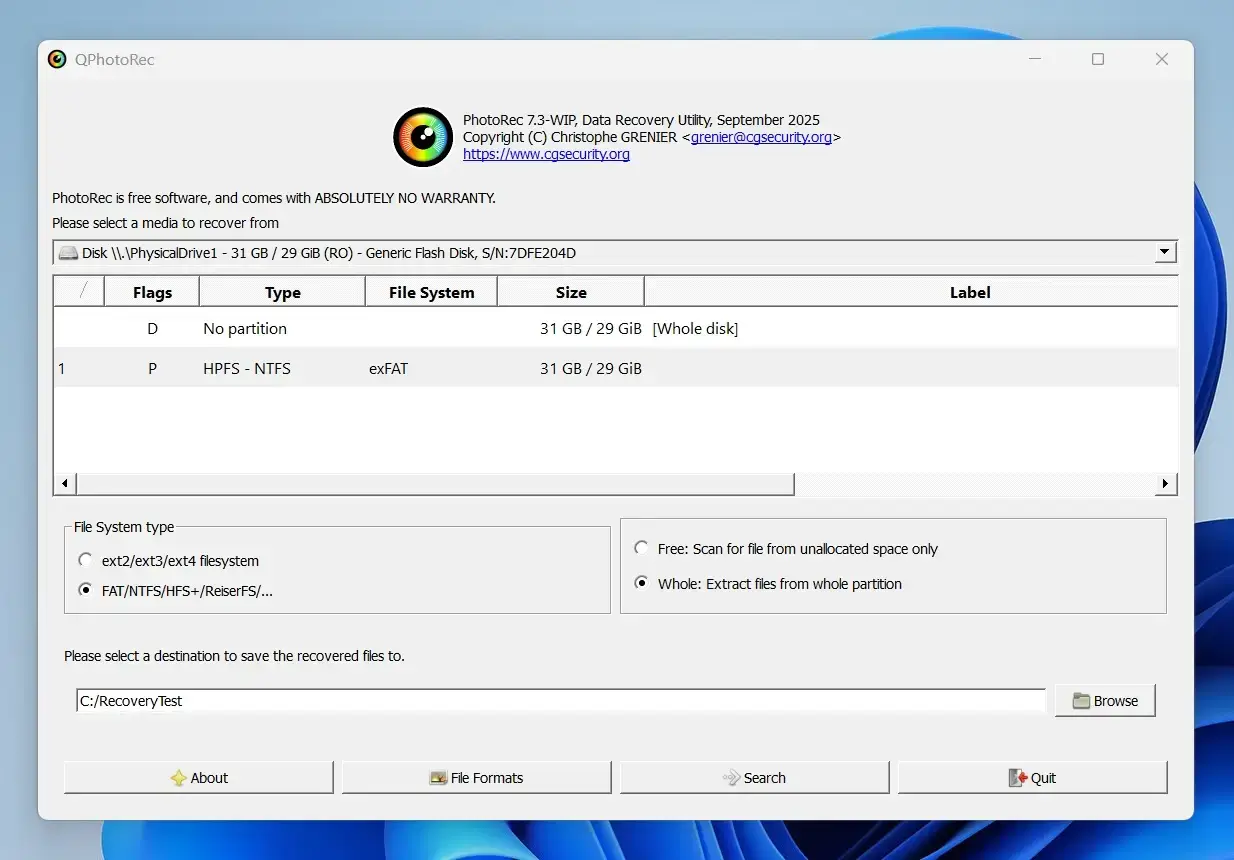
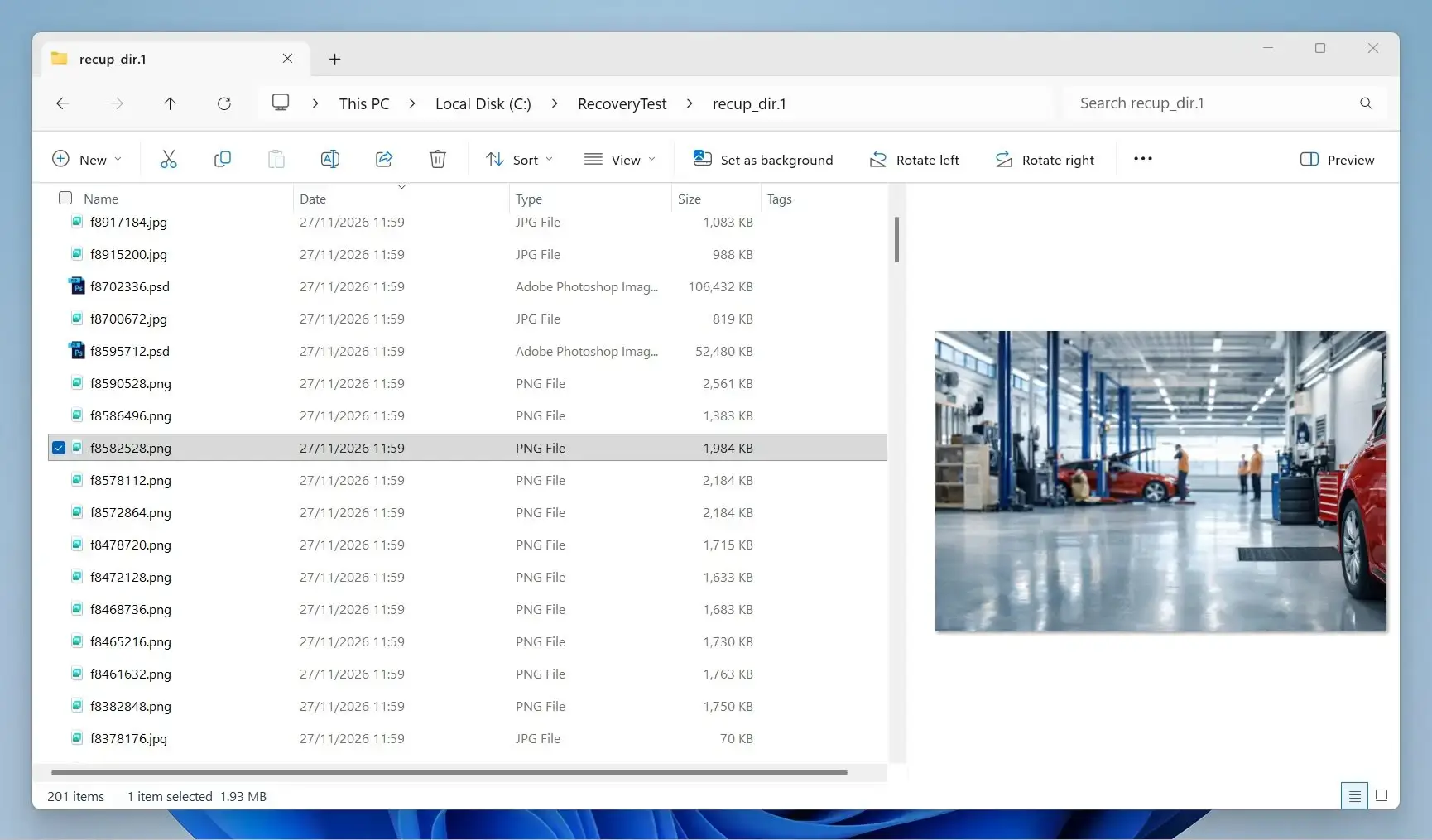
There is no license-based recovery limit, but the output requires some patience. Instead of Vacation/Beach_Sunset.jpg, you may find recup_dir.1/f1234567.jpg alongside hundreds of similarly named files.
For a small collection of images, thumbnails make sorting relatively straightforward. With thousands of spreadsheets or PDFs, identifying individual documents and rebuilding their directory structure can become a separate recovery project.
GNU ddrescue: Copying the Drive Before Recovery
GNU ddrescue addresses a different part of the open-source data recovery process. When a readable storage device encounters errors, the utility prioritizes copying accessible areas and tracks its progress in a mapfile. This lets you resume the imaging operation and revisit difficult regions later.
A full disk image requires separate storage with at least the source drive’s capacity. Our guide to choosing a portable SSD covers capacity and sustained write speeds.
You can then scan the resulting image with PhotoRec, TestDisk, or a compatible commercial application instead of repeatedly accessing the original drive. However, ddrescue does not extract deleted files itself, and a mechanically unstable drive containing irreplaceable data is better handled by a recovery laboratory.
What Commercial Recovery Software Adds
Disk Drill 6, available for Windows and macOS, is a useful example of how a commercial recovery suite handles several stages of recovery within one interface. Its capabilities extend beyond making file carving easier to use.
Combining Multiple Recovery Methods
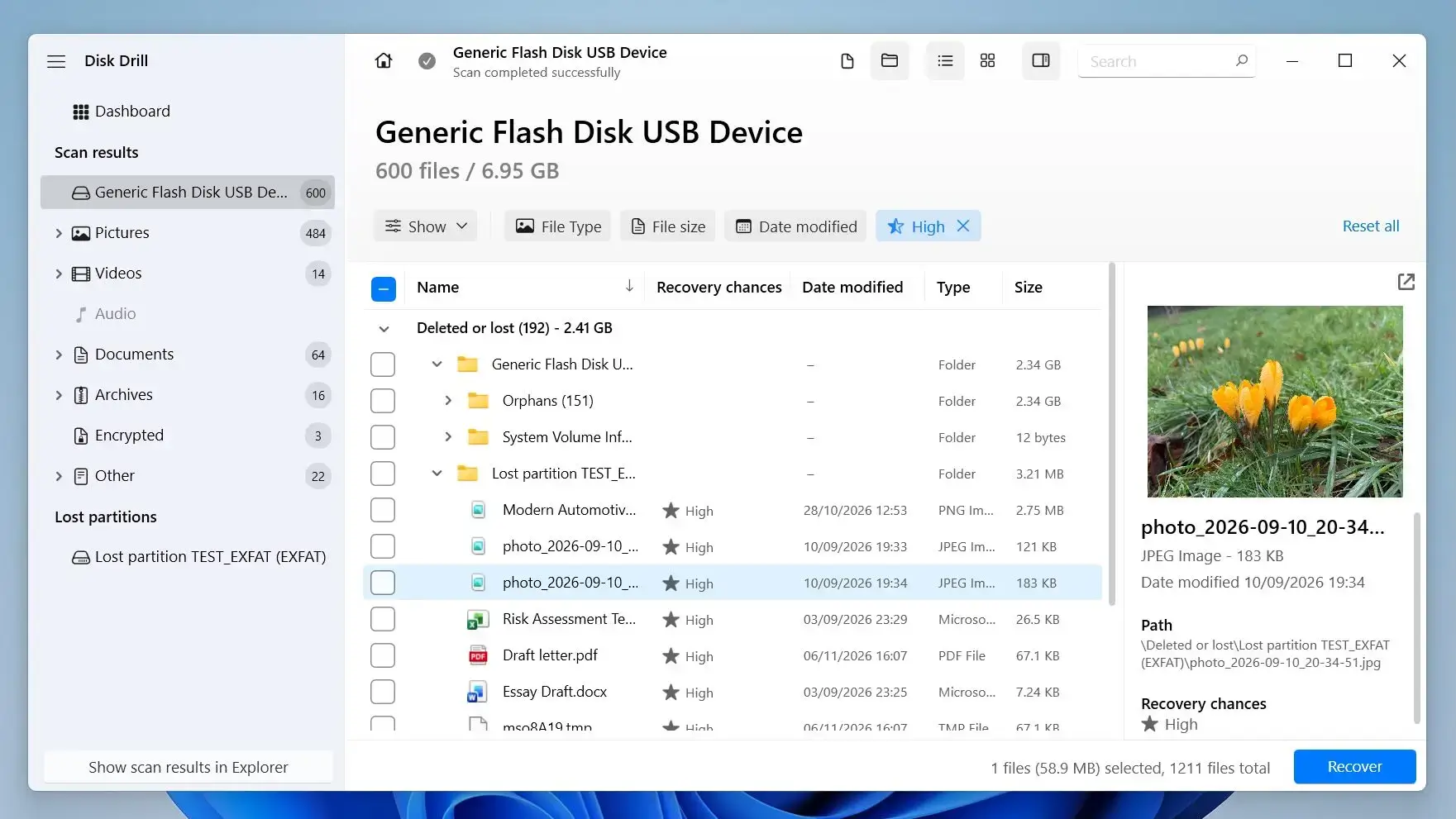
Disk Drill’s Universal Scan uses multiple recovery techniques to examine surviving file system structures and search for recognizable file contents. This is particularly useful when a drive contains a mixture of recently deleted files and older data whose directory information has been lost.
Rather than deciding upfront whether to attempt undelete or signature-based recovery, you can examine results from both approaches within the same scan. The software supports major file systems including NTFS, FAT32, exFAT, APFS, HFS+, and EXT4.
Disk Drill can also locate lost partitions and scan RAW volumes without requiring you to repair their file systems first. If usable directory records survive, results can retain original filenames and folder paths; files found solely by signatures may appear under automatically generated names instead.
Finding the Files You Actually Need
On a large drive, finding thousands of recoverable items is only half the job. Disk Drill lets you narrow the results by file type, size, name, and other attributes. You can browse surviving directories and preview supported photographs, documents, and videos without purchasing a license.
Its Recovery Chances estimates help prioritize individual files, particularly when several versions of the same document appear in the results. These estimates are not guarantees, so checking the actual content remains important. Our hands-on Disk Drill review examines how the software performs in practice, including after accidental deletion and quick formatting.
Beyond Conventional File Carving
Disk Drill includes several capabilities that are relevant to more demanding recovery jobs:
- Advanced Camera Recovery: a dedicated mode for supported cameras, action cameras, and drones that attempts to reconstruct fragmented recordings from their original memory cards or images. A standard carver may identify an MP4 header without recovering the remaining video fragments in the correct order.
- Byte-to-Byte Backup: creates a sector-level disk image that can be opened and scanned within Disk Drill, without requiring a separate command-line imaging utility.
- RAID recovery: automatically reconstructs supported RAID configurations for scanning when the necessary member disks or supported remote storage are accessible.
This Disk Drill video review shows the application in more detail.
Open-Source vs Paid Recovery: The Practical Differences
Feature | Open-Source Utilities | Commercial Recovery Suites |
| Recovery limits | None for the three tools discussed | Depend on the product and edition |
| Original filenames and folders | Possible with TestDisk in supported cases | Often available when metadata survives |
| File previews and filtering | Limited in the featured utilities | Common in graphical recovery suites |
| Disk imaging | GNU ddrescue | Integrated into some applications |
| Fragmented video recovery | Depends on format and utility | Specialized modes in some products |
| Technical support | Documentation and community resources | Vendor support varies by product and license |
Commercial tools also differ considerably in scope. R-Studio offers extensive RAID recovery controls, while DMDE provides detailed disk editing and file system analysis. When comparing the best data recovery software, consider how each application handles your particular file system, storage configuration, and type of data loss.
When a Paid License Is Worth the Investment
Free commercial editions can be surprisingly useful:
- Disk Drill Basic: free scanning and previews on Windows and macOS, plus up to 100 MB of free recovery on Windows. Free Mac recovery is limited to files protected beforehand by supported data protection features.
- R-Studio demo: recovery of individual files up to 1,024 KB.
- DMDE Free: up to 4,000 files from one selected directory per operation, with unlimited repetitions.
Before purchasing a license, consider what the free edition has already accomplished. If Disk Drill finds the files you need, preserves their original names, and displays working previews, the decision comes down to whether its free recovery allowance is sufficient.
The amount of data is only part of the equation. Recovering 50 GB of photographs with PhotoRec may cost nothing, but manually identifying and sorting thousands of unnamed files takes time. For a professional photographer or a business handling client records, preserving the original file organization can make a paid license more economical than an unrestricted free utility.
The Limits Both Approaches Share
Regardless of which recovery tool you choose, stop writing new data to the affected drive and always save recovered files to a separate physical device.
Repeated clicking, unexpected disconnections, or persistent read errors can indicate hardware failure. If the files are irreplaceable, power down the drive and consult a professional recovery service rather than testing several applications on it.
Even healthy storage has limits. Overwritten data cannot be retrieved from the original storage locations. On SSDs, TRIM and garbage collection can make deleted data inaccessible without deliberate overwriting. Encrypted volumes generally require the appropriate credentials or recovery key.
Who Actually Needs Paid Recovery Software?
If you have a straightforward recovery task and are comfortable using specialized utilities, there is little reason to pay before trying an appropriate free option. PhotoRec remains particularly useful for small collections of photos where retaining the original filenames is not essential.
For a large working archive, unfamiliar file systems, or fragmented camera footage, Disk Drill is a practical first choice because you can evaluate its results before buying anything. If the scan locates your files in usable condition and you need to recover more than the free edition allows, the license has a clear purpose. If it does not find what you need, spending money on that license will not change the result.