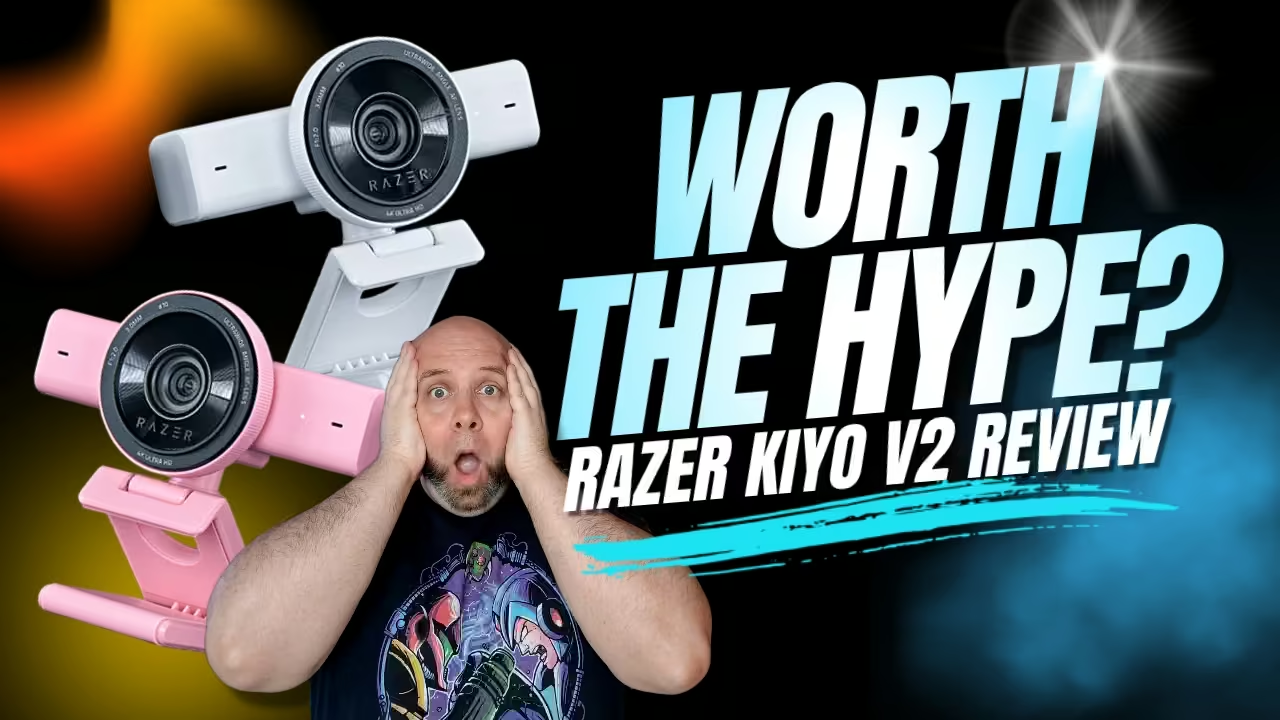
Quick verdict
The Razer Kiyo V2 is at its best for streamers, remote workers, and creators who don’t mind spending a little time dialling things in. What makes it stand out isn’t just the hardware. It’s the combination of solid image quality, flexible framing, and the included Camo Studio Pro software, which does a lot of the heavy lifting. What holds it back is equally clear: autofocus can be fussy, and 4K still tops out at 30 FPS. Even so, this is one of the smarter webcam buys under $200, especially if you care more about real-world results than spec-sheet theatre.
Key takeaways
- The Razer Kiyo V2 delivers strong 4K image quality with excellent low-light performance for its price
- Camo Studio Pro significantly enhances the experience and adds real value
- Autofocus can be inconsistent, but manual focus solves most issues
- Best performance comes from dialling in settings and creating custom profiles

A more mature direction for Razer webcams
The Razer Kiyo V2 webcam review starts with something Razer products don’t always lead with: restraint.
That’s the first surprise.
This isn’t a webcam trying to win you over with noise. No giant visual gimmick. No exaggerated gamer styling. No desperate “look at me” energy. You pull it out of the box, and it feels like Razer finally sat down and asked a practical question: what do people actually need from a webcam they’ll use every day?

And the answer, clearly, wasn’t more flair. It was a better balance.
The Kiyo V2 feels like a product made for people who are on camera a lot. People who hop into meetings, jump into OBS, record clips, tweak lighting, swap scenes, and care whether their face looks washed out under a monitor lamp at 9 p.m. That’s a different audience than the old “starter streamer” pitch, and it shows.
First impressions and positioning
The box is familiar enough. Same general size. Same basic presentation. Nothing dramatic there.
But the camera itself feels more substantial the second you pick it up. Heavier. Denser. Not heavy in a bad way. Just less toy-like. Less like an accessory you’ll replace in six months and more like a piece of hardware meant to stay on your desk.
That matters.
Webcams live in your eyeline. You see them every day. A flimsy one gets annoying fast. The Kiyo V2, at least at first touch, avoids that problem.
A shift away from gamer-first design
Older Kiyo models had a distinct look. Circular housing. Strong gamer vibe. Very obvious branding by form alone.
That’s mostly gone now.
The Kiyo V2 looks cleaner and more grown-up. It fits in a streaming setup, sure, but it also fits in a home office, a hybrid work station, or a minimalist desktop build where a chunky novelty webcam would look ridiculous. That broader appeal is one of its biggest strengths. It doesn’t demand that your desk orbit around it.
And honestly, that’s part of why it feels easier to recommend.
How the Razer Kiyo V2 was tested (real hands-on use)
This wasn’t a five-minute setup followed by a few sample shots and a shrug.
The Kiyo V2 was used in conditions that reveal whether a webcam is actually good or just good at first impressions. That meant regular video calls, desktop use, OBS streaming, and repeated switching between auto settings and manual tweaks. It was tested in daytime lighting, low-light daytime setups, nighttime conditions, and with different artificial light placements. It was also used long enough for the small annoyances to show up, which is where a lot of webcam reviews fall apart.
That hands-on use matters because webcams don’t live in ideal environments. They live under ceiling lights, beside windows, against messy backgrounds, and in front of people who move around more than they think they do. A camera that looks good in a controlled test can still be irritating in real life.
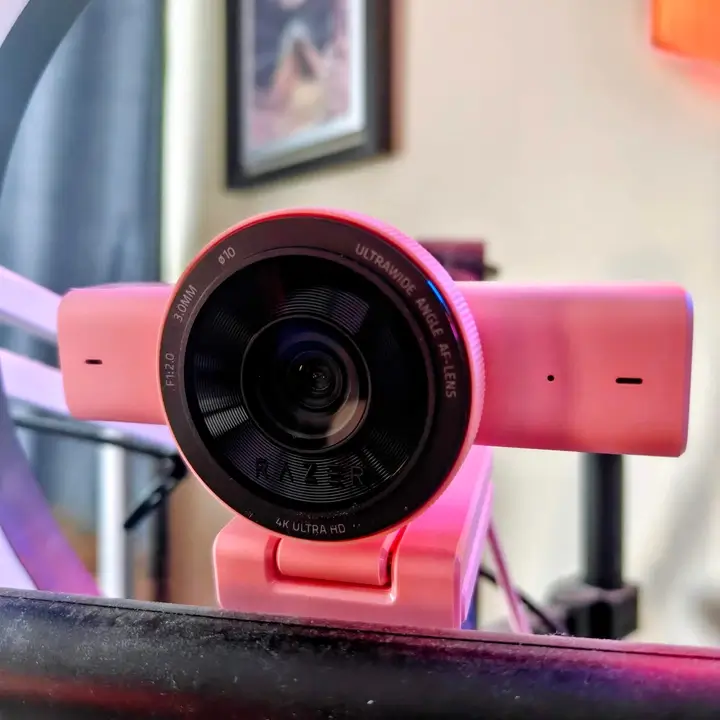
The Kiyo V2 was also used with the included Camo Studio Pro access, because skipping that would miss half the story. Razer is clearly leaning on that software partnership as part of the product value, and fairly so. It changes the experience in a meaningful way.
Across multiple reviews and hands-on use, its biggest strengths stay consistent: strong low-light performance, flexible framing, and a software package that adds real value.
Design and build quality: what’s changed and what works
A redesigned form factor
The move from the older circular look to a horizontal bar design was the right call.
It looks cleaner. It sits more naturally on a monitor. It feels more in line with how premium webcams look now, without simply feeling copied from someone else’s homework. It’s also more practical. The wider housing helps with microphone spacing and gives the camera a more balanced presence on top of a display.
And yes, it looks better. Sometimes that’s not the main thing. But it still matters.
Privacy shutter and mounting
The twistable privacy shutter is one of those features that sounds minor until you use it. Then it becomes oddly satisfying.
You twist it. It clicks. You know the lens is covered. No mystery. No relying on software icons. No wondering whether an app still has access.
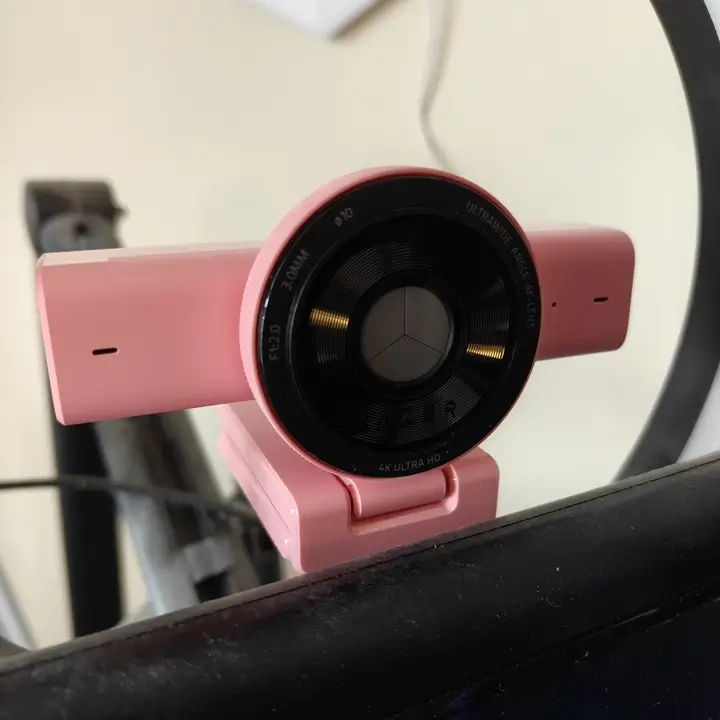
That said, the shutter wheel is also the one part of the camera that doesn’t feel quite as refined as the rest. It has a slightly plasticky feel. Not cheap, exactly. Just not as reassuring as the body itself. It’s the first thing that makes you think, “I hope that holds up.”
The mounting system is more convincing. The clip feels secure, the range of movement is useful, and the standard 1/4-inch thread on the bottom opens the door to tripods and desk mounts, which is great if you don’t want the camera directly on top of a monitor. That flexibility makes a real difference in multi-monitor setups or more deliberate content desks.
Colour options and setup aesthetics
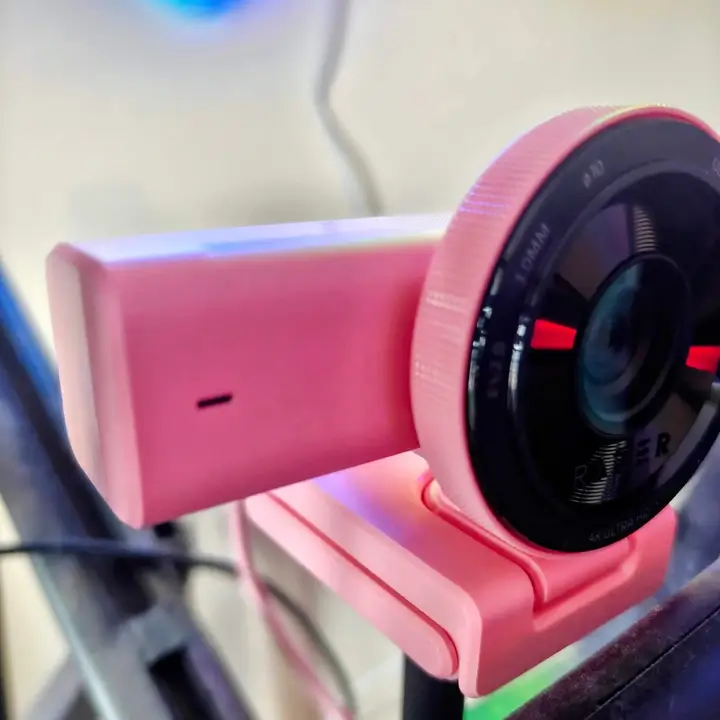
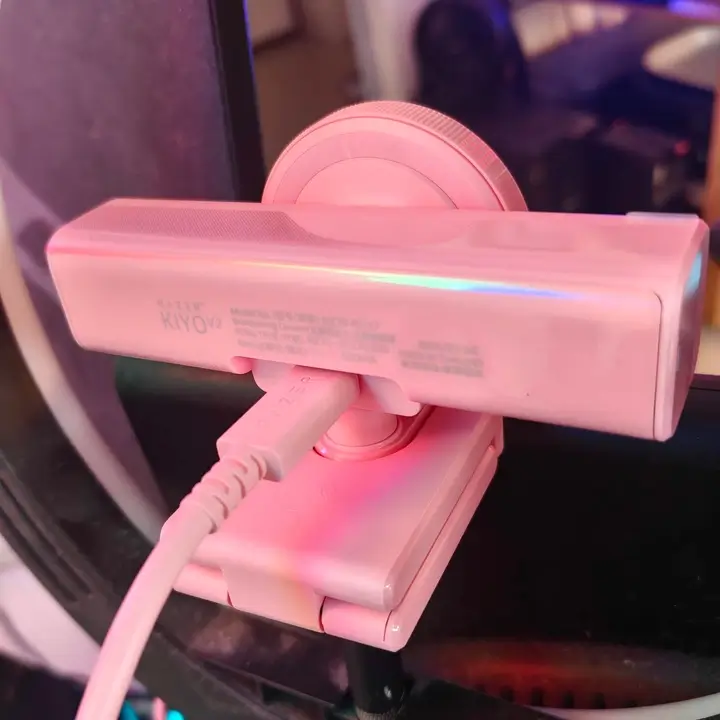
Razer also expanded the Kiyo V2 lineup with Black, White, and Quartz finishes. For the purpose of the review, I received the pink model.
That sounds like a style note. And it is. But it’s also practical. Plenty of people care about matching peripherals now. An all-white setup with one random black webcam stuck on top looks messy. The added colour options make the Kiyo V2 easier to fit into a curated desk space without paying a design penalty.
Source: Razer Kiyo V2 official product page
Razer Kiyo V2 image quality test: 4K performance, HDR, and low light
4K performance and Sony STARVIS sensor
The Kiyo V2 uses an 8.3MP Sony STARVIS sensor and supports 4K at 30 FPS and 1080p at 60 FPS.
That sensor choice matters. STARVIS sensors have a good reputation for a reason, and the Kiyo V2 benefits from it. The image is detailed without looking brittle. Colours are generally natural. Contrast is decent. It doesn’t give you that gross over-sharpened webcam look some brands still seem weirdly proud of.
And that’s the thing. The Kiyo V2 doesn’t try to wow you by turning every pore into a crisis. It looks more controlled than that.
Note: These samples are hosted on Vimeo to preserve image quality, giving a more accurate representation than heavily compressed platforms.
Razer Kiyo V2 4K 30FPS sample (real-world test)
This is a real 4K 30FPS sample from the Razer Kiyo V2 in a typical setup. The camera is set to manual focus to avoid constant refocusing, with framing and exposure adjusted for a stable image. Since this is hosted on Vimeo without aggressive compression, what you’re seeing here is much closer to how the camera actually looks in use.
- At 4K, the image is sharp and detailed, but motion is naturally limited by the 30FPS cap. It looks great for static setups, but you’ll notice the difference if you move around a bit.
Razer Kiyo V2 1080p 60FPS sample (smoother motion test)
This 1080p 60FPS sample shows how the Kiyo V2 performs in a more practical, everyday setup. With manual focus enabled and basic tuning applied, motion looks noticeably smoother and more natural—especially compared to 4K at 30FPS.
- This is the mode most people will end up using. It trades resolution for fluid motion, which makes a bigger difference in streaming, calls, and general use.
Low light and HDR performance
Low light is where this camera earns some respect.
Not because it turns darkness into daylight. It doesn’t. But it stays usable in situations where many webcams start to look ugly fast. In dim rooms, the Kiyo V2 still keeps faces recognizable and noise reasonably controlled. Add HDR into the mix, and it handles contrasty scenes better than expected. Bright windows, monitor glare, and uneven room lighting don’t instantly wreck the frame.
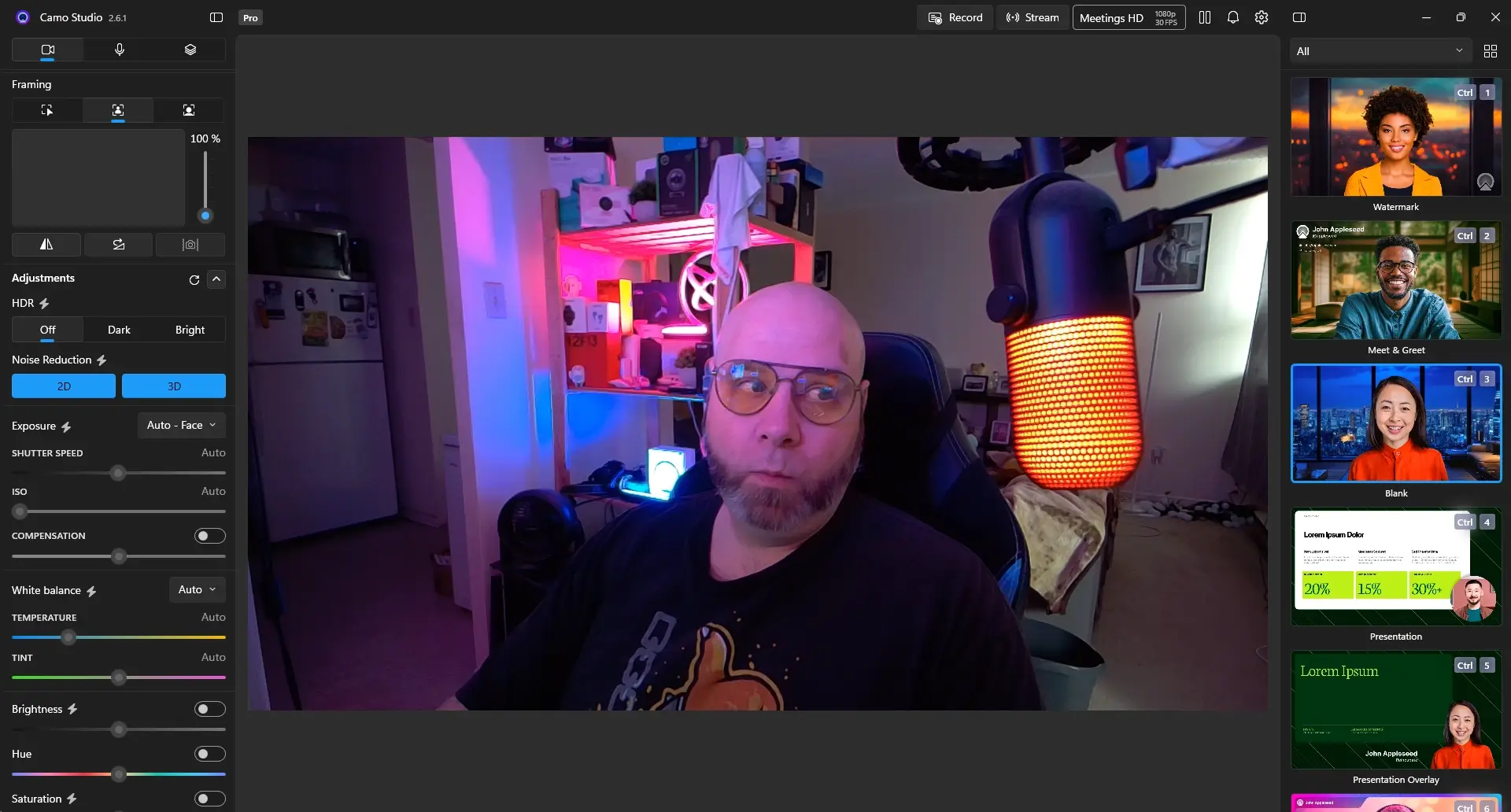

Still, there’s a caveat. Auto exposure can get a little overeager. Lighter skin tones can blow out faster than they should, particularly if the room lighting is inconsistent. You notice it most when the environment changes and the camera tries to compensate a touch too aggressively.
That doesn’t ruin the experience. But it does reinforce the bigger theme of this webcam: auto is good, manual is better.
What actually changes between lighting setups
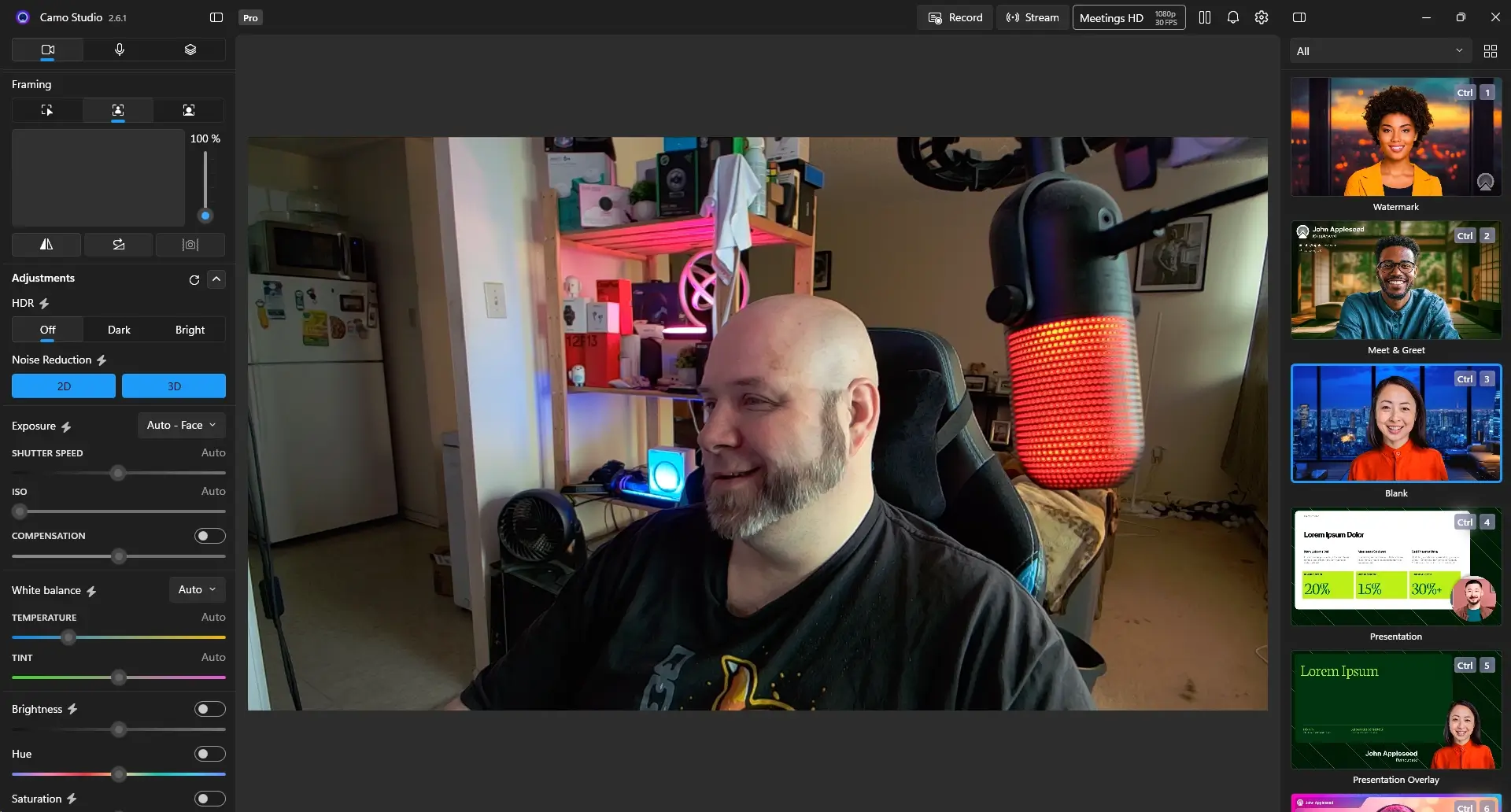
In daylight, the Kiyo V2 is easy to like. The picture looks balanced and clean with very little effort.
In low-light daytime conditions, things soften a bit, but the image stays usable and doesn’t collapse into mush.
At night, especially with mixed artificial lighting, the results get more dependent on the setup. This is where profile tuning starts paying off. Spend a few minutes adjusting settings for your actual room, and the Kiyo V2 becomes much more consistent than it looks out of the box.
That’s worth emphasizing. This is not a webcam that rewards laziness as much as it rewards small effort.

Field of view and framing
The 93-degree field of view is wide. Useful. Also, occasionally rude.
It gives you flexibility, which is great if you move around a bit, want a wider desk shot, or need room for auto-framing to work. But it also shows more of your environment than you may want. If your background isn’t exactly camera-ready, the Kiyo V2 will let everyone know.
Thankfully, software gives you options. Crop it. Blur it. Replace it. That wide lens becomes a lot more practical once you stop treating the default framing as sacred.
Audio quality: Are the built-in microphones good enough?
The built-in dual microphones do a better job than a lot of webcam mics, which is praise with an asterisk, but still praise.
Voice clarity is solid. Not rich, not broadcast-ready, but clear enough for calls, live chats, and everyday use. People on the other end won’t be asking you to repeat every third sentence. Background noise handling is also better than average for this category.
But let’s not oversell it.
Like basically every webcam mic, this one starts showing limits the second the conditions get less ideal. Move too far away, lean off-axis too much, or get noisy surroundings involved, and the quality drops. Fast. It’s perfectly fine for meetings and decent in a pinch for streaming, but anybody doing serious content work should still use a dedicated mic. That hasn’t changed. This webcam doesn’t magically rewrite the laws of audio.
Software and AI features: Is Camo Studio worth using?
Yes. And honestly, it’s not even close.
And this is where the Kiyo V2 gets much stronger as a package.
Camo Studio in practice
The included lifetime Camo Studio Pro license is a real value add, not just something tossed in to dress up the box copy.
Without it, the Kiyo V2 is a competent webcam in a crowded field. With it, the camera becomes much easier to customize, correct, and integrate into different workflows. That changes the conversation. You’re no longer judging hardware alone. You’re judging the total experience.
AI features that actually help
A lot of webcam “AI” features are nonsense in a trench coat. Camo’s tools are more useful than that.
Face retouching can be subtle instead of waxy. Background effects don’t instantly fall apart around hair and shoulders. Auto-framing uses the wider field of view intelligently rather than swinging around like it’s trying to follow a tennis match. The Kiyo V2 also now supports AI Face Retouching through Camo Studio, which Razer specifically highlighted for the updated lineup.
None of this replaces decent lighting or good setup habits. But it does reduce friction. And that matters when you use a camera often.
Source: Razer Kiyo V2 official product page
Razer Synapse… barely matters
Synapse is here. It functions. That’s about the nicest thing to say.
Once Camo is installed, Synapse becomes background furniture. It exists, but you’re not really living in it. The useful, meaningful control sits elsewhere.
Hands-on experience: using the Razer Kiyo V2 every day
This is where the Kiyo V2 gets more interesting, because day-to-day use is where good webcams separate themselves from ones that just look good on a spec sheet. After a few days of switching between different lighting setups and apps, the behaviour becomes much more predictable—and that’s where the Kiyo V2 starts to feel reliable.
Setup, usability, and workflow
Setup is straightforward. Mount it, connect it with the provided cable, install the software, and you’re basically there.
The USB-C connection may be mildly annoying for some desktop users if ports are limited, though adapters solve that problem easily enough. Once connected, the camera behaves reliably. It doesn’t throw weird connection tantrums. It doesn’t randomly disappear mid-session. It doesn’t feel unstable.
That’s not glamorous praise. But it is the kind that matters after a week of use.
Autofocus frustrations and the fix
Autofocus is the main annoyance here. It’s not terrible. It’s just busy.
Small movements can trigger refocusing more often than you want, and once you notice that behaviour, it becomes distracting. The easiest fix is also the best one: switch to manual focus and stop letting the camera second-guess you. What stood out most here is how quickly the experience improves once you take control away from auto settings.
That’s exactly the kind of tweak expert users will make without thinking twice. Casual users may take longer to get there, but once they do, the experience improves immediately.
Long sessions and profile-based use
Over longer calls and extended sessions, the Kiyo V2 stays stable. No overheating. No performance drop. No weird image degradation after an hour. That kind of consistency goes under-discussed in reviews, but it’s vital. A camera you’re going to use for work or live content has to stay dependable, not just look good in a ten-minute test.
Profiles also make a bigger difference than expected. Creating separate looks for daytime, low-light daytime, and night setups turns the Kiyo V2 into a more repeatable tool. Once you stop asking one setting profile to do everything, the camera starts feeling much more polished.
Real-world use cases: streaming, video calls, and content creation
For video calls, the Kiyo V2 is honestly a bit overqualified. Most platforms still won’t let you fully exploit the 4K sensor anyway. But better processing still helps. Even at lower delivered resolution, you look cleaner and more composed.
For streaming, the decision gets easier: 1080p at 60 FPS is usually the move. The Kiyo V2 can do 4K, yes, but most streamers will get more value out of smoother motion than higher resolution. That’s just reality.
For content creation, the camera becomes more compelling because of how much you can shape it. Camo profiles, manual focus, framing options, background tools, and low-light resilience all make it easier to tailor the output to your space rather than fighting your space every time you go live or hit record.
In real-world use, this ends up being the difference between a camera that feels average and one that feels dialled in.
Related Posts


Razer Kiyo V2 vs Kiyo Pro and V2 X: Which one should you buy?
The Kiyo Pro leaned more into hardware presence. Bigger feel. More traditional premium webcam energy.
The Kiyo V2 feels more modern in approach. More software-forward. More adaptable.
Against the Kiyo V2 X, the Kiyo V2 is clearly the more complete product. You get 4K support, a better overall imaging package, and full Camo Studio Pro access. The V2 X makes sense if budget is the main concern. The V2 makes sense if you actually care about squeezing more from the setup.
That’s the split.
Razer Kiyo V2 specifications and features
| Feature | Details |
|---|---|
| Sensor | 8.3MP Sony STARVIS |
| Resolution | 4K @ 30 FPS, 1080p @ 60 FPS |
| Field of View | 93° |
| Microphone | Dual stereo, 16-bit / 48kHz |
| Connectivity | USB-C |
| Mounting | Clip + 1/4-inch thread |
| Software | Razer Synapse, Camo Studio Pro |
| Price | $149.99 USD |
Source: Razer Kiyo V2 official product page
Is the Razer Kiyo V2 worth it in 2026?
Yes—the Razer Kiyo V2 is worth it in 2026, but only if you’re willing to tweak it. After spending time adjusting profiles and settings, it becomes clear that this webcam rewards effort more than most in its class.
If you want pure plug-and-play simplicity and never want to think about settings again, there are easier choices. But if you don’t mind spending a little time dialling in focus, exposure, and profiles, the Kiyo V2 pays that effort back.
That’s the core of its value. Not perfection. Control.
Who should buy the Razer Kiyo V2 (and who shouldn’t)
This webcam makes the most sense for people who don’t mind tweaking their setup.
If you stream regularly, take a lot of video calls, or want more flexibility with framing, lighting, and profiles, the Kiyo V2 is a strong fit.
But if you want a completely plug-and-play webcam with zero adjustment, it may feel slightly fussy. The Kiyo V2 rewards effort. If you’re willing to put in a few minutes, it gives you more control than most webcams in this range.
Where webcams still fall short (and what to expect)
Even a good webcam is still a webcam.
Most platforms still limit what you can actually transmit. Lighting still matters a ridiculous amount. And no, this isn’t replacing a proper camera setup if you’re chasing cinematic video. The Kiyo V2 improves the category, but it doesn’t escape it.
That perspective matters because it keeps expectations in check. You’re buying a strong webcam, not a miracle.
Will the Razer Kiyo V2 last? Long-term value and future-proofing
The best argument for the Kiyo V2 aging well isn’t raw hardware. It’s software support.
Camo gives the webcam room to stay useful beyond its launch moment. That matters in a category where a lot of devices are sold once and then quietly forgotten. The hardware seems solid overall, even if the shutter wheel raises mild questions. But the software ecosystem is what gives it a longer runway.
And in a product like this, that’s exactly what you want.
FAQs about the Razer Kiyo V2 webcam
Is the Razer Kiyo V2 worth it in 2026?
Yes—the Razer Kiyo V2 is worth it in 2026, but only if you’re willing to tweak it. The combination of solid 4K image quality, strong low-light performance, and the included Camo Studio Pro software makes it one of the better-value webcams under $200.
Is the Razer Kiyo V2 good for streaming?
Yes, but it makes the most sense at 1080p 60 FPS rather than 4K 30 FPS, especially for fast-moving content. For most streamers, smoother motion will matter more than the jump to 4K.
Does the Razer Kiyo V2 require Camo Studio?
No, the webcam works without Camo Studio. But using Camo Studio unlocks much more of what makes the Kiyo V2 stand out, including better framing control, AI-powered features, and more flexible image adjustments.
How is the autofocus on the Razer Kiyo V2?
Autofocus can be inconsistent. It tends to react more often than necessary, especially with small movements. Switching to manual focus creates a much more stable and predictable experience.
Is the Razer Kiyo V2 good in low light?
Yes, it performs better in low light than most webcams in its price range. It won’t turn a dark room into a studio, but it does stay clean and usable in dim conditions, especially when HDR and custom profiles are used properly.
Are the built-in microphones good enough?
The built-in dual microphones are good enough for meetings, casual calls, and everyday use. They sound clearer than many webcam mics, but they still don’t replace a dedicated microphone for serious streaming, recording, or content work.
What makes the Razer Kiyo V2 different from the Kiyo V2 X?
The Kiyo V2 offers 4K support, a stronger overall imaging package, and a lifetime Camo Studio Pro license. The Kiyo V2 X is more affordable, but it is also more limited and misses some of the features that give the Kiyo V2 its edge.
Can the Razer Kiyo V2 replace a DSLR camera?
No, not completely. A DSLR or mirrorless camera still offers better image depth, lens flexibility, and overall quality. But for a webcam, the Kiyo V2 does a very good job and is more than capable for video calls, streaming, and most creator workflows.
Final verdict: Should you buy the Razer Kiyo V2?
After extended use, what sticks isn’t just the image quality—it’s how adaptable the entire setup becomes. The Razer Kiyo V2 webcam review lands in a pretty sensible place.
This isn’t the most revolutionary webcam on the market. It’s not trying to be. It’s trying to be useful, flexible, and good enough often enough that you stop thinking about it once it’s set up properly.
And it gets there.
You get strong image quality. Better-than-average low-light performance. Real software value. Cleaner design. Enough control to shape the output around your room and your workflow instead of the other way around.
The downsides are real, but manageable. Autofocus gets twitchy. 4K is capped at 30 FPS. A small part of the build feels less premium than the rest. None of that changes the bigger story.
The bigger story is that the Kiyo V2 is smartly built. Not flawless. Smart.
And that tends to age better.