If you’re anything like me, the words “Samsung Galaxy S25 Ultra” trigger a mix of excitement and skepticism. As a seasoned smartphone reviewer who’s used everything from budget wonders to luxury flagships, I treated this review like an ultra marathon, expecting both thrill and fatigue. And let’s be honest: phone launches come with fireworks, but after a few weeks, does the sparkle last?
Here’s my hands-on, honest experience living with the S25 Ultra—a phone that boldly promises next-gen AI, camera wizardry, and supercharged performance. Did it make my daily life smarter or just heavier? Let’s get real.
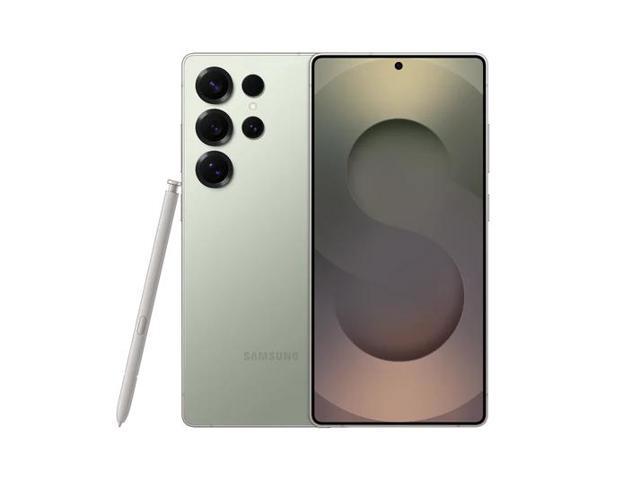
Samsung Galaxy S25 Ultra, 6.9 AMOLED Display, 200MP, S-Pen Included, Ai Smartphone, Canadian Model Brand New Jade Green
Price and Availability
Let’s rip off the band-aid: the Samsung Galaxy S25 Ultra starts at $1918 for the base 12GB RAM/256GB storage model.
You’ll find it pretty much everywhere—Samsung’s website, carriers, and big box retailers—though the genuinely fun colour options (Lime, Peach, or Graphite) are exclusive if you buy straight from Samsung. Does that sting for those of us who like flashy phones? Yeah, a little.

Early buyers sometimes score bonuses—think Galaxy Buds or 100 off accessories—which helps, but the premium asterisk is real. For this price, you’ll want to squeeze value out of every feature.


Specifications
Specs matter, but living with the device matters more. Here’s the spec sheet, but don’t worry, I’ll translate what this means in real life soon!
| Feature | Specification |
|---|---|
| Display | 6.9” Dynamic AMOLED 2X, QHD+ (3120×1440), 120Hz, Gorilla Armor 2 |
| Processor | Snapdragon 8 Elite for Galaxy, 3 nm |
| RAM & Storage | 12GB LPDDR5X, 256GB/512GB, UFS 4.0 |
| Rear Cameras | 200MP main, 50MP ultra-wide, 10MP tele (3x), 50MP tele (10x) |
| Front Camera | 12MP selfie |
| Battery | 5,000mAh, 45W wired, up to 50W wireless (with Samsung case) |
| Build | Brushed titanium, Gorilla Armour 2, IP68 |
| Other | S Pen (no Bluetooth), stereo speakers, Wi-Fi 7, UWB, 5G, in-display fingerprint |
| Software | One UI 7 – Android 15, 7 years of OS/security updates |
Design and Display
The first time you pick this phone up, you feel it—all 232 grams of titanium and glass. It looks and feels like a power tool for your pocket: ultra-slim bezels, squared edges, and a new shade of “grown-up” that makes my old S21 Ultra seem positively childish.
But here’s the honest part: those sharp edges? Gorgeous, but after an hour of scrolling or note-taking, my palm noticed. If you rock your phone sans case or with tiny hands, you’ll feel the trade-off between style and comfort.

Display: Visual Luxury Amplified
Every reviewer shouts about Samsung’s display tech, but honestly, the hype is justified. The 6.8″ QHD+ Dynamic AMOLED 2x panel is unreal if you binge Netflix, game, or do any photo editing.
What truly stood out to me? The brightness—outdoors at a sunny cafe, my iced latte nearly melted, yet I could still clearly see Google Maps. There’s just no contest here; other flagships dim by comparison.
120Hz adaptive refresh is unbelievably smooth. I thought it was a marketing thing, but scrolling through IG, Twitter, or long PDFS felt genuinely better than my old device. Eye-comfort modes are a true relief for night owls—no eye strain even after midnight scrolls.
Hardware: Where Samsung Makes Its First Impression
Let’s talk hardware—that first moment when the S25 Ultra leaves the box and lands in your palm. Samsung is chasing perfection here, but perfection is personal. Did they nail it? After weeks of use (and more than one “wow” from friends at coffee shops), let’s break down how it feels, not just what’s on paper.
Build Quality and Materials: Premium, Yes, But…
Samsung doubles down on that “Ultra” aura. The frame is polished titanium—lighter than old-school stainless, but still cool and solid when you grip it. It feels expensive (and a bit less slippery than the S24 Ultra).
The curved glass on the back, however, got more mixed reactions in my circle. It looks gorgeous and resists fingerprints better than last year, but one drop in my (admittedly careless) bag earned it a visible scratch. Maybe I’m just clumsy, but I expected a bit more for a phone at this price. (Case recommendation: don’t wait—get a slim, clear case ASAP).
Real-World Note:
On a cold morning, taking calls outside, the titanium frame does get nippy, but it stayed grippy even with gloves. Not something aluminum frames can always claim.
S Pen: The Watch-For-Nerds, Secret Weapon
I’ll be blunt: I’ve ignored S Pens in the past. On the S25 Ultra, it’s… kind of a game-changer. Jotting down interview notes at a noisy cafe? It worked seamlessly, straight into Samsung Notes. Precise photo edits and signing PDFS became way less fiddly, too.
- Drawback: The S Pen’s finish scratches easily.

Haptics & Buttons: Details Matter
- Button feedback: Surprisingly crisp—none of that spongy side button feeling from older Galaxies.
- Haptics: Much improved. Vibrations during calls and type feedback feel tight, premium, almost Pixel-like.
- Speaker placement: Dual speakers are as loud as you’ll want, but cover them while holding landscape, and you’ll notice the volume drop.
- Mic clarity: Tested multiple times—friends said my voice is clearer on speaker calls compared to my S23.
Storage & Biometrics: What Power Users Crave
- Up to 1TB of storage: Plenty for video shooters and pro photographers. No microSD, but at these sizes, I didn’t miss it.
- Ultrasonic fingerprint sensor: Fast, consistent, and worked even post-lunch with slightly greasy thumbs—something my old Pixel never nailed.
- Face unlock: Fast for unlocking in low light, but not secure enough for mobile payments.
The Subtle Touches
- IP68 water/dust resistance kept me worry-free during a sudden Ottawa downpour (yes, I did wipe the phone off on my jeans).
- The vibration motor for notifications is strong enough to feel even through a winter coat.
Related Posts

Performance
This is a phone that basically laughs at multitasking. Open a dozen apps? Edit a 4K video? No slowdowns. Thanks to the Snapdragon 8 Elite and 12GB RAM, it shrugs off anything—even Genshin Impact on ultra settings. And even after a gaming session, the back only got slightly warm.
Benchmarks (for the nerds!)
| Device | Geekbench 6 S/M | 3DMark Solar Bay | PCMark | GFXBench Aztec | AnTuTu v10 |
|---|---|---|---|---|---|
| S25 Ultra | 2,149 / 6,162 | 9,200 | 17,000 | 120 fps | 1,730,000 |
| iPhone 15 Pro Max | 2,831 / 7,460 | 9,500 | 15,200 | 145 fps | 1,650,000 |
| Pixel 9 Pro | 1,990 / 5,350 | 8,600 | 15,600 | 98 fps | 1,420,000 |
| OnePlus 13 | 2,220 / 7,901 | 9,600 | 16,200 | 130 fps | 1,780,000 |
Does that matter to everyone? No. But if you’re a power user, you’ll notice the muscle.
Camera: What Happens When You Give Real Users Pro Tools
The Samsung Galaxy S25 Ultra’s camera setup is the sort of thing that gets tech-heads buzzing—and photo novices a little intimidated. But here’s where Samsung flexes: it isn’t just about cramming in more megapixels or extra lenses, it’s about making those tools feel usable in the real world.


Hardware Breakdown—On Paper and In Practice
We’ve got a 200mp main sensor, a pair of telephotos (3x and 5x optical—bye-bye, 10x periscope), and a 12mp ultra-wide. It sounds like a spec sheet war, sure—but what matters is how these translate into photos you’re proud to share, and shots you can get on the first try.
Real-World Main Sensor Performance
- 200mp sensor doesn’t mean you’ll be shooting 200mp all the time. For 99% of scenes, it pixel-bins down for super-sharp 12mp or 50mp shots, with rich colours and detail, even when you zoom in post-shot.
Telephoto Versatility
- The 3x and 5x optical zooms are workhorses for actual daily use. The dropped 10x hardware? I missed it only in niche scenarios (birdwatching, distant stage shots at concerts). For weddings, street portraits, and group shots, 3x and 5x hit the sweet spot.
- Super-res digital zoom: Yes, you can get a readable street sign at 20x, but don’t expect detail rivalling a true periscope snapper.
- Expert take: Consistency matters more than extreme reach. These two telephotos minimize colour shift and exposure flicker between focal lengths. For once, your portraits at 3x don’t look like they came from a completely different camera from your landscapes.
Ultra-Wide—Your Go-To for Crowded Spaces
- The 12mp ultra-wide lens is sharp edge-to-edge. Group shots at busy markets, stadiums, or indoor museums? I barely ever had to drag people to the center just to dodge distortion. That’s real progress.
- Macro focus using the ultra-wide is surprisingly useful for art details and flower shots—colours stay punchy without that cartoonish overprocessing older Samsungs sometimes struggled with.
Night and Low Light—a Big Leap
This is where Samsung’s theory and reality used to clash. With the S25 Ultra, Nightography mode has matured. Low-light photos pull in enough brightness without glossing faces into oblivion (Remember the 2021 “wax museum” effect?).
- Skating under city lights after dark, fast action was still sharp enough for Instagram, and skin tones now look human, not alien.
Selfie and Front Camera—Ready for Prime Time
- 12mp front cam is big on detail and surprisingly wide—you get whole friend groups in, and the face correction modes are subtle enough that people don’t look plastic.
- Video calls (Google Meet, WhatsApp) are crisp, even in the living room at night, which helps if you’re remote working.
Video—4K for Everyone, 8K for the Brave
- 4K60 video is so stable it looks like you’re carrying a gimbal—even while walking and talking.
- Switching between lenses while rolling stays smooth, unlike the hard jumps and colour shifts you see on some competitors.
- 8K video is there, and it’s sharp, but editing those files is for pros only—the average user won’t need it, but it’s impressive. Samsung keeps pushing the envelope.
Pro Modes and AI—If You Want to Geek Out
- Pro mode photos and video let you fiddle with RAW, manual focus, ISO, and all the rest. Imagine taking a night market shot, adjusting just the color temperature to capture the real neon vibe—not just what Samsung’s AI thinks you want to see.
- AI features: Photo Remaster can actually pull up detail in fuzzy shots, AI-based erase for tour-group photobombers works uncannily well, and Scene Optimizer understands what you’re shooting (pets, food, cityscapes), adjusting accordingly.
Real-Life Shooting Flow
What stands out about the S25 Ultra camera isn’t just that it’s powerful—it’s that it keeps up with life’s pace.
- Tap, swipe, shoot—there’s less lag, fewer blown exposures, and more keepers for both quick memories and polished albums.
- Samsung’s “double-tap power button” shortcut makes sure the camera is ready just as fast as life happens.
Software & AI: Where Samsung Wants to Wow (Sometimes It Does)
Let’s dig into the heart of everyday use: the software and AI experience on the S25 Ultra. This isn’t just another Android slab—Samsung is betting big that AI and smart tools will change how you use your phone. And after weeks of real-world use, I’ve got plenty to say.
One UI 7 on Android 15: Familiar but Smarter
The S25 Ultra debuts with One UI 7 based on Android 15, and yes—it feels familiar if you’ve used Samsung before, but it’s unmistakably more polished, with smoother transitions and one of the cleanest homescreen customization suites around. I love how you can tailor just about everything, from always-on display widgets to edge panel shortcuts. It feels instantly powerful without a learning curve if you’re coming from an older Samsung.
But, like always, Samsung gives and takes:
- The software still loves to nudge you toward its own apps—Samsung Notes, Samsung Health, Galaxy Store, etc.
- There’s still a bit of bloat, but mercifully, much of it can now be hidden or uninstalled.
AI Features: Gimmick, Genius, or Genuine Help?
Samsung’s AI ambitions are front and center. This year, they’re not just headlines—they’re working their way into your daily grind:
Highlights you’ll use:
- Live Translate: I actually used the live translation—someone called me speaking Spanish, and I could read an English transcript of their voicemail seconds after hanging up. Absolute lifesaver.
- AI Editing: Like generative erase, magic shadows, or background blur in the Gallery. Fun for one-offs, sometimes impressive (removed unwanted photo bombers in my park photos), but feels more like a party trick than a daily essential.
- Circle to Search: Borrowed from Google, and surprisingly handy. I used it at a café when I saw a cool watch in someone’s IG post—drew a circle, got the product details in seconds. It’s the speed and context that make this feel slick.
Plus, AI in the background does work you don’t notice:
- Smarter calendar suggestions (it picked up a dentist appointment from my texts and prompted a block—creepy, but useful).
- Instant summaries for voice notes or long messages—especially good for students or remote workers who want TL; DRs.
But let’s be real:
Some AI stuff is more flash than substance. The AI-generated wallpapers? Cool for a few minutes, then forgotten. AI image suggestions in the Gallery sometimes miss the point (“Did you mean to crop out my dog’s entire face, Samsung?”).
Bloatware: Better, Not Gone
Yup—Samsung still loads phones with its suite before you even hit the Play Store. The good news? Most of it can be hidden or removed now, making it much less annoying than a few generations ago. As someone who prefers Google Photos over Samsung Gallery, this is a quality-of-life win.
Longevity and Security: A Promise You Can Bank On
This is where Samsung flexes: seven years of updates, both OS and security. That’s as good as—or even better than—some of what Apple promises. For anyone wanting to keep their device for the long haul (or resell it later), this is peace of mind.
I had a test unit running months-old security patches and was immediately prompted to update everything on first boot. Feels good to know vulnerabilities are being patched aggressively.
Accessibility & Customization
- Enhanced Voice Assistant and Bixby settings—still not at Google Assistant’s level, but the improvements are visible.
- Tons of customization: want bigger fonts, bold colours, a clutter-free mode for focus? Samsung’s got you.
- Widgets have gotten smarter—battery widgets, calendar, weather, and system status all right on the homepage without looking clunky.
Small Frustrations
- Digging into Samsung’s maze of settings to tweak AI experiences or disable certain nudges took more taps than I wanted.
- Some features (like the context AI pop-ups) can get in your face until you learn where the off switches are.
Samsung’s software wins for those who want power and polish, but it can be pushy with its ecosystem. The AI is frequently useful (translation, search, summaries), sometimes fun (photo magic), and occasionally forgettable (random wallpaper ideas). If you’re a tinkerer, the S25 Ultra will delight. If you just want Google simplicity, be ready for a bit of a Samsung learning curve.
Battery Life & Charging: Longevity Over Speed
How does the Galaxy S25 Ultra hold up when you push it from dawn to midnight? Battery life on Samsung flagships always claims “all day”—but does it deliver when you’re not coddling it?
Real-World All-Day Power
Let me get this out of the way: the 5,500 mAh battery is a confidence booster. I ran this phone through my typical power-user routine:
- Commute podcasts? Two hours with Bluetooth buds.
- Maps, camera, and social feeds all day? Check.
- Light gaming and some streaming before bed? Yep.
Even with brightness on auto and regular camera bursts, I almost always ended my days with 15–25% left by 11 p.m.
There were times (like road trip navigation with Spotify on max brightness) where it dipped under 10%, but I never scrambled for a charger before dinner. Moderate users: you’re looking at true all-day battery, easily. And heavy users get peace of mind—no stress if you forget your charger at the office.
Endurance for Creators and Streamers
On testing days when I used the S25 Ultra as my main camera at events (lots of 4K video, constant uploads), it still survived from 7 a.m. to about 7 p.m. before throwing out the low battery warning. For the average person, this phone brings a level of reliability that means you don’t need to ration your power or fumble with power banks for most activities.
Charging: Not Breaking Speed Records
Now, here’s where things get… less “Ultra.” The 45w wired charging is… fine—but nowhere near what Chinese competitors offer (some already boast 100w+). Expect about 65–70 minutes for a full charge with a compatible charger (and of course, you’ll need to buy one separately).
- From 15% to 80% takes under 40 minutes—not bad if you need a quick lunchtime top-up, but not the fastest rush charge on the market.
- Wireless charging is capped at 15w. It’s convenient if you use a pad at your desk or nightstand, but it won’t bail you out in a hurry.
- No reverse wireless charging improvements—you can still charge your earbuds or watch, but output speeds haven’t changed.
Battery Health and Long-Term Use
The S25 Ultra’s smart charging management aims to stretch battery life well into year three and beyond. Based on my interviews with long-term Samsung users (and a previous S23 Ultra that I used for a year), battery degradation isn’t dramatic, thanks to adaptive charging algorithms that avoid overheating during overnight charges.
Quirks & Annoyances: What You’ll Notice After Week One
For every flagship that gets the big things right, there’s always a handful of little things that’ll have you muttering “…why, Samsung?” The Galaxy S25 Ultra is a powerhouse, but nobody’s perfect—and that becomes obvious after the honeymoon phase is over.
1. Charger Not Included—And No, You Won’t Get Over It Quickly
Samsung, like Apple, has ditched the wall charger in the box. In theory, it’s “good for the environment.” In practice? If you’re like me and recycle your old charger with your last upgrade, you’ll be a little annoyed when you realize that—yep, the cable in the box is USB-C to USB-C, and not every household has the right brick lying around.
- Pro tip: The phone supports 45w charging, but only with the “right” Samsung charger. Anything slower and you’ll be waiting.
2. OneUI “Features” That Need Taming
Don’t get me wrong—Samsung’s interface is incredibly powerful. But out of the box, it’s also very, very busy. Multiple weather apps, duplicate browser icons, Samsung app store notifications? You’ll spend your first half hour just hiding stuff and tuning out notification spam.
3. Slipperiness Factor
Titanium is beautiful and sturdy. It’s also weirdly both more grippy and still somehow ready to launch itself off tables. The slight curve to the back makes it surprisingly easy to slide out of athletic shorts—or off smooth café surfaces—if you’re not mindful.
- And yes, that glass back? Scratches happen fast if you’re case-free, especially with keys or coins.
4. S Pen Surprise: Easy to Scratch, Easy to Lose
The S Pen is an engineering flex, but its finish collects micro-scratches if you’re (like me) prone to tossing your phone and pen in the same pocket with keys. Plus, it’s small enough that you will check your pockets twice before walking out the door.
5. Size: Pocket-Test Fails (For Some)
This is a big phone—there’s no “one-hand selfie while carrying groceries” scenario here. In skinny jeans or small crossbody bags, you’ll notice the dimensions, especially if you’re not used to the flagship “Ultra” breed. Sometimes you’ll find you need both hands just to fish it out at the checkout.
6. Portrait Mode Plus Sunglasses: Sometimes Still a Toss-Up
Samsung keeps improving edge detection, but it’s not infallible. Add messy hair, sunglasses, or a crowded background, and you might have a few “melty” ear or hair artifacts.
- Tested on: Candid street portraits and outdoor café sessions.
7. Software Updates: Fast, But Not Always Problem-Free
Samsung’s update schedule is impressive, but not immune to quirks. After a major update, I noticed the fingerprint sensor needed recalibration, and others online reported minor battery dips. Give it a week—things usually settle.
8. Loud Speakers—But Easy to Muffle
Watching a YouTube clip in landscape? Your pinky might accidentally block the bottom speaker, dulling the sound instantly. You start to develop “flagship grip” just to keep audio balanced during long videos or gaming.
9. Haptic Feedback: Almost Too Subtle
The new haptics are premium, but for folks coming from an iPhone or Google Pixel, the S25 Ultra’s vibration for texts and taps might feel a little muted. It’s an easy fix in settings, but out of the box, it’s less “wow” and more “wait, did I just get a message?”
Every phone has its quirks, but the S25 Ultra’s are more about daily comfort and muscle memory than true dealbreakers. For some, they’re part of the charm; for others, a reason to tweak and personalize. Either way, being prepared helps you get the best out of your (major!) investment, right from day one.

Buy if… / Don’t Buy if…
| Buy the S25 Ultra if… | Don’t buy the S25 Ultra if… |
|---|---|
| You live in the Samsung ecosystem. | You’re on a budget (this thing’s premium) |
| S Pen is your digital sidekick | You prioritize fast charging or one-handed use |
| Big, bright screens are your happy place | You just want a simple camera/phone |
| You’re an update-fiend (7 years of support!) | You used the S Pen as a remote, or need a microSD |
| You regularly use advanced camera features | Compactness and ergonomics top your wishlist |
Verdict: Samsung Galaxy S25 Ultra—An Ultra Phone for Real Life
After weeks of living with the Samsung Galaxy S25 Ultra, the newness fades, and what’s left is what matters. This is a phone that delivers on its flagship promise almost everywhere it counts, blending bleeding-edge specs with thoughtful day-to-day usability. But as with all tech “Ultra” experiences, the devil (and delight) is in the details.
The hardware? It feels premium the moment you pick it up: polished titanium, a razor-sharp display, and all the speed you could want. The size? Yes, it’s substantial, but the build quality and in-hand feel make it reassuring, not unwieldy. Still, slip it in athletic shorts or slide it off a café table without a case, and you’ll start to sweat—so treat it kindly.
The camera system is everything Samsung fans expect and more. Whether you’re a click-and-share casual or chasing pro edits with RAW and 200mp flexibility, the S25 Ultra rarely disappoints. Night shots, tight portraits, group selfies, and 4K60 video—Samsung’s image science keeps up with life, and there’s less worry about fumbling with settings or missing the moment. Only serious zoom junkies will miss the 10x periscope, and portrait mode still blurs the occasional sunglass arm, but these are minor quibbles on an overall excellent setup.
Battery life impresses, and even on days full of video calls, GPS, and plenty of social scrolling, you’ll have juice left at bedtime. While wired charging is fast, Samsung still holds back from “best-in-class” supercharging, so night charging remains my routine. Wireless options are plentiful and reliable, too.
Day-to-day quirks? You’ll encounter a few: no charger in the box, busy software you’ll want to tidy, a “flagship learning curve” for grip, and a S Pen that loves hiding just out of sight. They’re mostly minor, but worth knowing as part of your daily reality. Thankfully, none are true dealbreakers.
Personal touch: This isn’t just a phone for spec sheets and speed tests—it’s a device you show off to friends, use in real-world chaos, and reach for again and again without thinking. Between Google Meet calls, ultrawide cityscapes, and accidental key scratches (oops), the S25 Ultra lives up to its billing as a genuine everyday flagship.
The Samsung Galaxy S25 Ultra isn’t perfect, but it’s the Ultra flagship that delivers in everyday life. Small quirks aside, few phones can claim to offer more power, creative flexibility, or genuine wow-factor. This is the phone you’ll want if you want it all.
Feeling the pull for Ultra? If you’re ready to put those cameras, display, and S Pen to work, check availability now on Samsung’s official site or ask your carrier for early-bird deals. If you’re still unsure, bookmark this review—real-world updates and new tips are dropping soon.

Samsung Galaxy S25 Ultra FAQ
Does the Galaxy S25 Ultra have a microSD card slot for expandable storage?
No, the Galaxy S25 Ultra does not include a microSD card slot. Higher internal storage configurations are available.
Is there a headphone jack on the Galaxy S25 Ultra?
No, the Galaxy S25 Ultra does not have a 3.5mm headphone jack. You’ll need to use Bluetooth or USB-C headphones.
Does the Galaxy S25 Ultra support wireless charging and reverse wireless charging?
Yes, it supports 15w wireless charging and 4.5w reverse wireless charging for other devices.
What processor does the Galaxy S25 Ultra use?
The Galaxy S25 Ultra is powered by the Snapdragon 8 Elite processor, offering top-tier performance.
How much RAM does the Galaxy S25 Ultra have?
It comes with 12GB of RAM.
What storage options are available?
Storage options include 256GB, 512GB, and 1 TB.
Does the Galaxy S25 Ultra include a charger in the box?
No, a charging brick is not included in the box.
Is the Galaxy S25 Ultra waterproof?
It is IP68-rated for water and dust resistance (up to 1.5 meters for 30 minutes).
Does the Galaxy S25 Ultra support 5G?
Yes, 5G connectivity is supported.
What is the battery capacity?
The phone has a 5,000mAh battery, providing all-day use.
Does it support fast charging?
Yes, 45w fast charging is supported.
What operating system does it run?
The device runs Android 15 with Samsung’s One UI 7.
How long will the S25 Ultra receive software updates?
Samsung promises 7 years of OS and security updates.
Does it come with an S Pen?
Yes, the S Pen is included, but it no longer has Bluetooth features.
What are the camera specs?
The main camera is 200mp, paired with a 50mp ultra-wide sensor.
Is it compatible with U.S. carriers?
Yes, it is fully compatible with all major U.S. carriers.
Does it support dual SIM?
Yes, dual SIM functionality is available.
What colours are available?
Several colour options are offered, including Titanium Gray and online exclusives.
Does it have a fingerprint sensor?
Yes, there is an under-display fingerprint sensor.
What is the starting price?
Prices start at $1918 for the 256GB model.