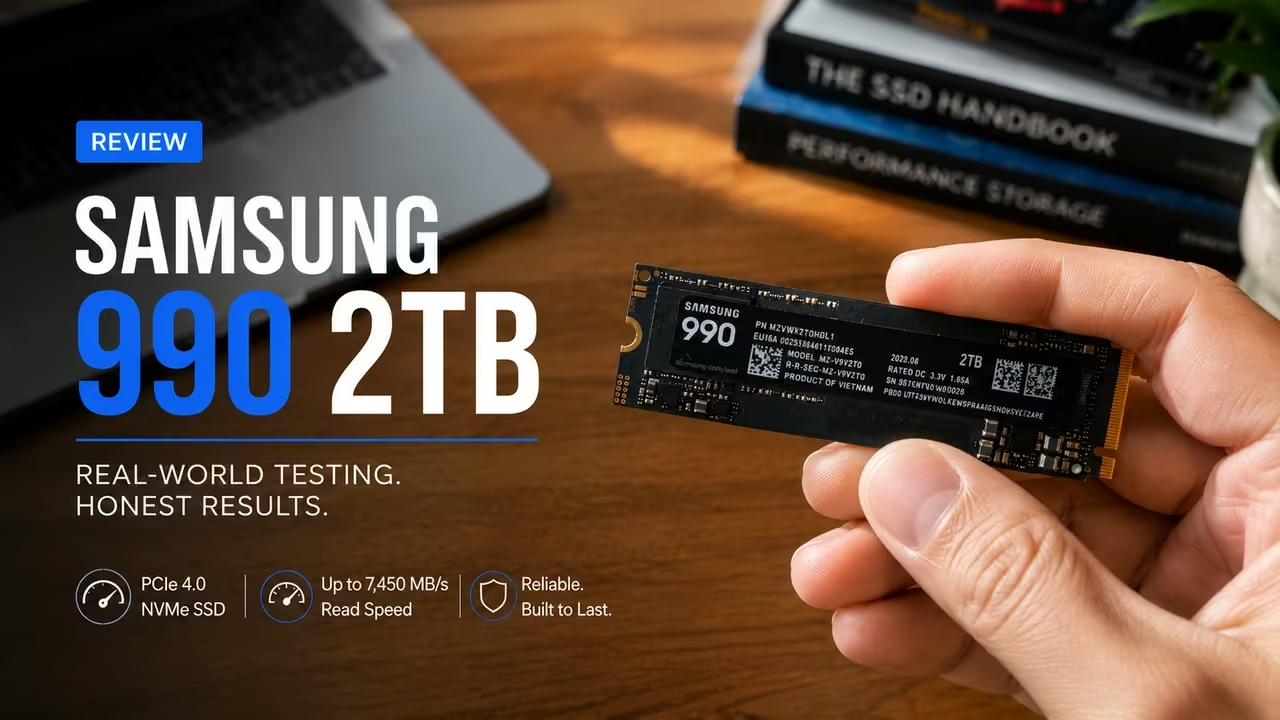
When I first tested the Samsung 990 2TB, the result did not look like the performance you would expect from a modern NVMe SSD.
CrystalDiskMark showed 440.60 MB/s sequential read speed and 433.42 MB/s sequential write speed. Those figures looked more like the results from an external SATA-class drive than a fast PCIe 4.0 SSD.
It would have been easy to blame the Samsung 990 and call it slow. That conclusion would also have been wrong.
The drive was installed inside a JMicron-based external enclosure. The benchmark therefore measured the entire storage path, including the enclosure controller, USB cable, USB port, and computer. It did not measure the full performance of the SSD by itself.

After testing the drive with CrystalDiskMark, ATTO Disk Benchmark, and 3DMark Storage Benchmark, the same pattern appeared in every program. The external connection reached its limit near 440 MB/s, while the SSD still had much more performance available.
That experience is the key to this Samsung 990 2TB review. The drive should not be judged by a limited USB result when it was designed to run in an internal PCIe 4.0 x4 M.2 slot.
-
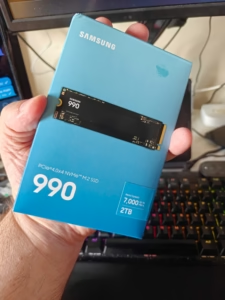
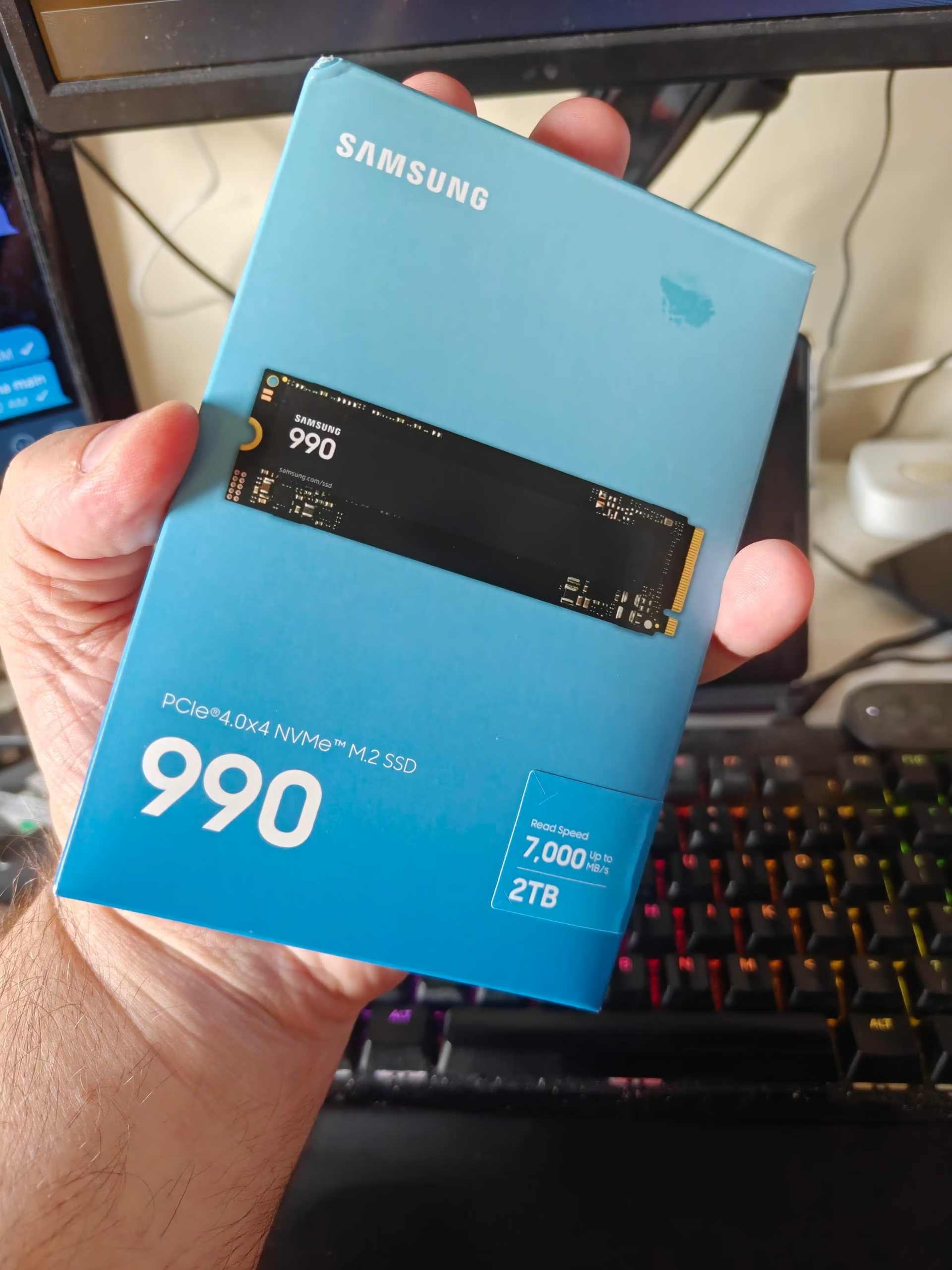
- The Samsung 990 2TB retail package before installation. This review begins with a hands-on look at the drive before testing its performance using CrystalDiskMark, ATTO Disk Benchmark, and 3DMark Storage Benchmark.
-
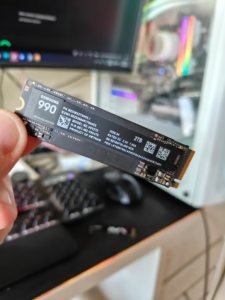
- A close-up of the Samsung 990 2TB NVMe SSD before installation in the test system. The drive was evaluated through hands-on benchmarking and compared with published PCIe 4.0 performance results to assess real-world speed, gaming performance, and overall value.
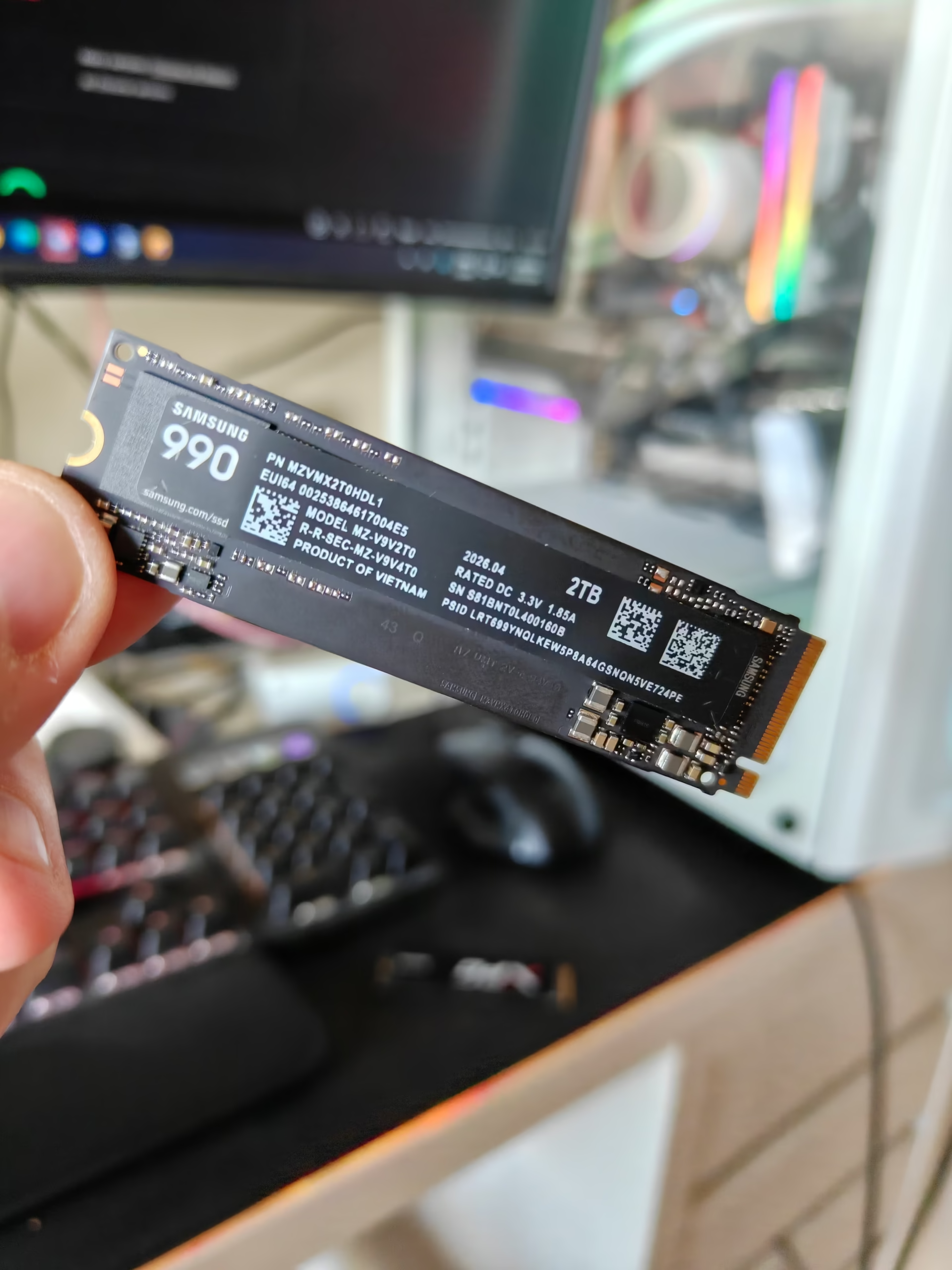
Samsung 990 2TB Review Summary
The Samsung 990 2TB is a PCIe 4.0 NVMe SSD built for internal M.2 storage. In the tested USB enclosure, it reached about 440 MB/s for reads and 433 MB/s for writes because the external connection became the bottleneck.
Published tests of the same 2TB model averaged approximately:
| Measurement | Performance |
|---|---|
| Sequential read | 7,044 MB/s |
| Sequential write | 5,667 MB/s |
| Measured external read | 440.60 MB/s |
| Measured external write | 433.42 MB/s |
Compared with the external result, the cross-review internal average was roughly 16 times faster for sequential reads and 13 times faster for sequential writes.
The Samsung 990 is a strong option for buyers who have a PCIe 4.0 M.2 slot and want fast game storage, responsive everyday performance, and 2TB of capacity. It is less suitable for buyers who plan to keep it inside a basic 5 Gbps USB enclosure, because that setup leaves most of the drive’s performance unused.
My Experience Testing the Samsung 990 2TB
I tested the 2TB Samsung 990 while it was empty and formatted as NTFS with a 4 KB allocation unit. The drive was installed inside a JMicron-based USB enclosure.
I used three benchmark programs instead of depending on one test:
- CrystalDiskMark 9
- ATTO Disk Benchmark
- 3DMark Storage Benchmark
CrystalDiskMark was run with the Real World profile, an 8 GiB test size, and five passes. ATTO used a 2 GB file, Direct I/O, and a queue depth of eight. The 3DMark Storage Benchmark replayed gaming-related activities such as loading, installing, saving, recording, and moving games.
Using three tools mattered because each one measured something different. CrystalDiskMark showed sequential and random performance. ATTO showed how speed changed with different transfer sizes. 3DMark showed how the storage setup behaved during mixed gaming workloads.
All three tests pointed to the same conclusion: the Samsung 990 was not the limiting part of the setup.
![Samsung 990 ssd 2tb pcie gen4 nvme m. 2 internal solid state hard drive,upto 7,250mb/s,fast speed for gaming, direct storage & memory expansion, mz-v9v2t0b/am [canada version]](https://m.media-amazon.com/images/I/71TbbDStZKL._SS520_.jpg "Samsung 990 2TB Review: A Fast PCIe 4.0 SSD | Smart Tech, Sharp Takes - CRYOVEX.com")
SAMSUNG 990 SSD 2TB PCIe Gen4 NVMe M.2 Internal Solid State Hard Drive,Upto 7,250MB/s,Fast Speed for Gaming, Direct Storage & Memory Expansion, MZ-V9V2T0B/AM...

SAMSUNG SSD 990 EVO Plus 2TB PCIe M.2 - 7,250MB MZ-V9S2T0 — BRAND NEW SEALED
Samsung 990 2TB CrystalDiskMark Results
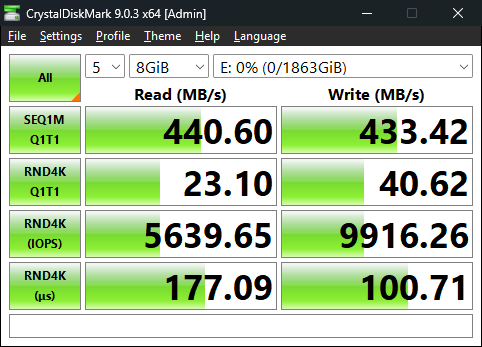
CrystalDiskMark measured the following results:
| Test | Read | Write |
|---|---|---|
| Sequential Q1T1 | 440.60 MB/s | 433.42 MB/s |
| Random 4 KB Q1T1 | 23.10 MB/s | 40.62 MB/s |
| Random 4 KB IOPS | 5,639.65 | 9,916.26 |
| Average latency | 177.09 microseconds | 100.71 microseconds |
The sequential read and write speeds were separated by only about 7 MB/s. That balance was encouraging because it did not suggest a serious weakness in one direction.
The random 4 KB results were much lower than the sequential results, which is normal. Small-file workloads require the system to process many separate requests. That creates more overhead than moving one large file.
The important detail is that the 440 MB/s result does not represent the Samsung 990’s full PCIe 4.0 capability. It represents the limit of the external storage path used in the test.
Why the Samsung 990 Reached Only 440 MB/s
An SSD does not determine performance by itself. Every part of the connection affects the final result.
In this test, data travelled through the following path:
Samsung 990 NVMe SSD → JMicron enclosure → USB cable → USB controller → computer
The slowest part of that chain controlled the final speed.
A result near 440 MB/s is consistent with the usable throughput of a 5 Gbps-class USB connection after normal overhead. The test does not prove whether the enclosure controller, cable, USB port, or negotiated link speed caused the exact cap. It does show that the external path could not carry data as quickly as the SSD could provide it.
For buyers, this distinction matters. A low benchmark result does not automatically mean the SSD is defective. The connection may be the real limit.
Related Posts

ATTO Confirmed the USB Bottleneck
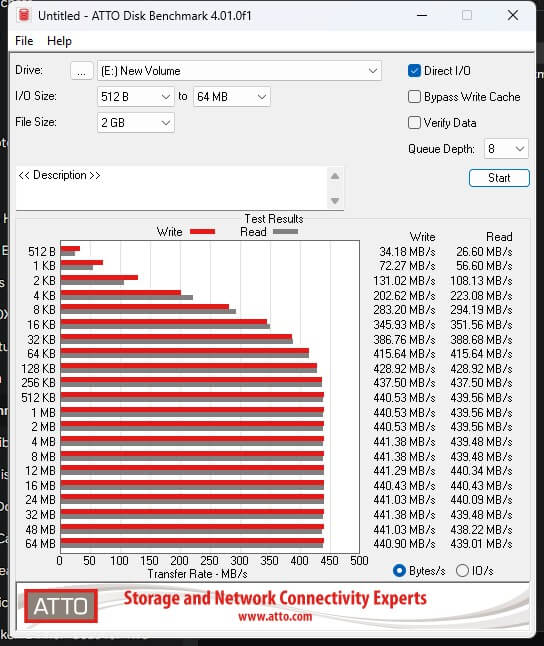
ATTO Disk Benchmark made the performance ceiling easier to see.
| Transfer Size | Read | Write |
|---|---|---|
| 512 bytes | 26.60 MB/s | 34.18 MB/s |
| 4 KB | 223.08 MB/s | 202.62 MB/s |
| 16 KB | 351.56 MB/s | 345.93 MB/s |
| 64 KB | 415.64 MB/s | 415.64 MB/s |
| 256 KB and larger | About 440 MB/s | About 440 MB/s |
Performance increased quickly as the transfer size grew. Once the blocks reached about 256 KB, the graph became almost flat.
Larger transfers did not make the drive faster because the storage path had already reached its limit.
This was useful evidence because it showed a stable ceiling rather than unstable or failing performance. The SSD could provide more speed, but the external connection could not move the data any faster.
Samsung 990 Gaming Storage Performance
The 3DMark Storage Benchmark produced a score of 891, average bandwidth of 156.91 MB/s, and average access time of 207 microseconds.
The workload results were:
| Workload | Bandwidth | Access Time |
|---|---|---|
| Load Battlefield V | 269.54 MB/s | 295 microseconds |
| Load Call of Duty: Black Ops 4 | 239.30 MB/s | 340 microseconds |
| Load Overwatch | 160.22 MB/s | 156 microseconds |
| Record a game | 76.67 MB/s | 112 microseconds |
| Install a game | 102.90 MB/s | 136 microseconds |
| Save a game | 76.59 MB/s | 100 microseconds |
| Move a game | 375.00 MB/s | 698 microseconds |
These results were lower than the CrystalDiskMark sequential numbers because 3DMark does not move one clean file from beginning to end. It replays mixed gaming activity.
A game installation may read a large archive, unpack it, create thousands of files, and update a database. A game load can mix small settings files with large textures and audio files.
The move-game test came closest to the USB limit because it relied more heavily on large, continuous transfers.
This also explains why a faster SSD does not make every game load several times faster. Games still depend on the processor, graphics card, file decompression, shaders, and game engine.
Samsung 990 2TB PCIe 4.0 Performance
The report compared published results from StorageReview, PCWorld, The SSD Review, and TweakTown to estimate what the same drive can deliver when installed internally.
The reviewers used different computers and benchmark settings, so the figures should be treated as a cross-review estimate rather than a controlled laboratory average.
| Review Source | Benchmark | Read | Write |
|---|---|---|---|
| StorageReview | FIO peak synthetic | 7,177 MB/s | 6,070 MB/s |
| PCWorld | CrystalDiskMark 8 | About 7,100 MB/s | About 5,400 MB/s |
| The SSD Review | ATTO | 6,650 MB/s | 5,530 MB/s |
| TweakTown | CrystalDiskMark | About 7,250 MB/s | Not precisely stated |
The average came to about 7,044 MB/s read, and 5,667 MB/s write.
Actual performance will depend on the processor, motherboard, firmware, Windows settings, temperature, and benchmark profile. Even with those differences, the scale of the improvement is clear.
Moving the Samsung 990 from a limited USB enclosure to a proper PCIe 4.0 x4 slot should change performance from hundreds of megabytes per second to several thousand.
What Will Feel Faster in Daily Use?
The largest improvement should appear during large file transfers. The tested enclosure capped long transfers near 440 MB/s, while an internal PCIe 4.0 connection gives the drive room to operate at several gigabytes per second.
Installing and moving large games should also become faster, although the processor and game launcher may become the next bottlenecks.
Game loading may improve, but the difference is usually smaller than the headline benchmark gap suggests. Games spend time preparing shaders, decompressing files, loading assets, and waiting for other system components.
Normal Windows tasks may feel more responsive, especially when opening applications or working with large folders. However, routine desktop use rarely requires 7 GB/s of continuous bandwidth.
Creative projects, large caches, video files, and AI-related workloads are more likely to benefit from higher sustained throughput.
Samsung 990 vs PCIe 5.0 SSDs
PCIe 5.0 provides more bandwidth than PCIe 4.0. High-end Gen5 drives can approach 15 GB/s in ideal sequential tests.
Samsung rates the 2TB 9100 PRO at up to 14,800 MB/s read and 13,400 MB/s write. StorageReview measured approximately 14,600 MB/s read and 13,300 MB/s write in a peak test.
The Samsung 990 is a PCIe 4.0 SSD. Installing it in a PCIe 5.0 M.2 slot will not turn it into a Gen5 drive. It will continue to operate at PCIe 4.0 speed.
To reach Gen5 performance, both the SSD and the motherboard slot must support PCIe 5.0.
For gaming, everyday Windows use, office work, and most home systems, the Samsung 990’s PCIe 4.0 performance is already strong. A Gen5 SSD makes more sense for users who regularly handle very large video files, project caches, AI models, workstation data, or transfers between two extremely fast drives.
A 100 GB Transfer Comparison
The report also calculated ideal transfer times for a single 100 GB file.
| Setup | Write Speed Used | Ideal Time for 100 GB |
|---|---|---|
| Tested USB enclosure | 433 MB/s | About 3 minutes 51 seconds |
| Samsung 990 internal average | 5,667 MB/s | About 18 seconds |
| Samsung 9100 PRO Gen5 rating | 13,400 MB/s | About 7.5 seconds |
These figures are simple calculations, not guaranteed copy times. The source drive, destination drive, file type, cache, temperature, and system overhead will affect real-world performance.
A fast destination cannot receive data at 13 GB/s when the source drive can only read at 500 MB/s. Both sides of the transfer must be fast enough.
Even with that limitation, the example shows why an internal PCIe connection can save significant time during large transfers.
Long Write Performance and Cache Limits
The Samsung 990 uses part of its flash as a fast write cache. While the cache is available, the drive can write at several gigabytes per second.
The source material reports that PCWorld’s 2TB sample maintained high cached performance for more than roughly 350 GB. After the cache filled, write speed moved between about 50 and 350 MB/s and spent much of the test near 200 MB/s.
Most buyers will not write more than 350 GB without a break, so this behaviour is unlikely to affect normal gaming or everyday use.
It matters more when cloning a large drive, restoring a full backup, moving a huge video project, or running repeated professional write jobs.
Buyers with heavy sustained-write workloads should consider this behaviour before purchasing.
Samsung 990 Design and NAND Type
The Samsung 990 is a DRAM-less PCIe 4.0 SSD that uses Host Memory Buffer, or HMB.
HMB allows the drive to borrow a small amount of system memory for data mapping instead of using a dedicated DRAM chip on the SSD.
Samsung does not publicly identify the exact NAND type in its product specifications. Some reviewers describe or infer QLC NAND, while the available source material notes that Samsung has not confirmed it.
The most accurate description is that the Samsung 990 is a DRAM-less, HMB-based PCIe 4.0 SSD with an unconfirmed NAND type.
That detail is important in a trustworthy review. A product should not be labelled as QLC or TLC unless the manufacturer or another reliable source confirms it.
Who Should Buy the Samsung 990 2TB?
The Samsung 990 2TB is a good fit for:
- Gamers who need room for a large game library
- Desktop or laptop owners upgrading from SATA storage
- Buyers who want strong PCIe 4.0 sequential performance
- Creators who work with large files but do not need premium Gen5 speed
- Users who want 2TB of internal storage for games, applications, media, and project files
It becomes especially attractive when its price is competitive with other high-speed 2TB PCIe 4.0 drives.
Who Should Skip the Samsung 990 2TB?
The Samsung 990 may not be the right choice for:
- Systems without a compatible M.2 slot
- Buyers who plan to use it only through a slow USB enclosure
- Workstations that require native PCIe 5.0 performance
- Users who regularly perform extremely long sustained writes
- Buyers who require a confirmed TLC drive or onboard DRAM
The drive can work inside a compatible PCIe 5.0 slot, but it will still run at PCIe 4.0 speed.
Is the Samsung 990 2TB Worth Buying?
The Samsung 990 2TB is worth considering when you need fast, high-capacity PCIe 4.0 storage and your computer has a compatible internal M.2 x4 connection.
The firsthand tests did not show clear signs of a defective SSD. CrystalDiskMark and ATTO found the same stable ceiling near 440 MB/s, while 3DMark showed how the same limit affected mixed gaming tasks.
The balanced read and write results, flat ATTO curve, and agreement across several benchmark tools all point to the external connection as the main bottleneck.
Published PCIe 4.0 tests suggest that the same model can reach around 7,044 MB/s read and 5,667 MB/s write under suitable conditions.
Before buying, check that your motherboard or laptop has an available M.2 slot, supports PCIe 4.0 x4, accepts the correct drive size, and provides suitable cooling where required.
When those conditions are met, the Samsung 990 2TB offers strong performance for gaming, large applications, everyday work, and general internal storage.
Frequently Asked Questions
Why is my Samsung 990 only reaching 440 MB/s?
A result near 440 MB/s often means the drive is being limited by an external USB connection, enclosure, cable, USB port, or negotiated link speed. In this test, the Samsung 990 reached 440.60 MB/s read and 433.42 MB/s write through a JMicron-based enclosure.
Is the Samsung 990 PCIe 4.0 or PCIe 5.0?
The Samsung 990 is a PCIe 4.0 NVMe SSD. It can operate in a compatible PCIe 5.0 M.2 slot, but it will remain limited to PCIe 4.0 speed.
Is the Samsung 990 good for gaming?
Yes. Its PCIe 4.0 performance and 2TB capacity make it suitable for game libraries, installations, and file transfers. Game-loading gains will still depend on the CPU, game engine, file decompression, and other hardware.
Does the Samsung 990 have DRAM?
No. The Samsung 990 is a DRAM-less SSD that usesa Host Memory Buffer to borrow a small amount of system memory for mapping tasks.
Is the Samsung 990 QLC or TLC?
Samsung does not publicly confirm the exact NAND type in its product specifications. Some reviewers infer QLC, but the available evidence does not support presenting that as a confirmed fact.
Will a USB enclosure slow down the Samsung 990?
Yes, unless the enclosure and USB connection provide enough bandwidth. A 5 Gbps-class USB path can limit the drive to around 440 MB/s after overhead, leaving most of its PCIe 4.0 capability unused.
Is PCIe 5.0 worth paying more for?
PCIe 5.0 is most valuable for large production files, high-resolution video, AI models, project caches, and other sustained workloads. For gaming and normal desktop use, PCIe 4.0 remains a strong practical choice.
Can I install the Samsung 990 in a PCIe 5.0 slot?
Yes. PCIe is backward compatible, so the Samsung 990 can work in a compatible PCIe 5.0 M.2 slot. However, the drive will continue to run at PCIe 4.0 speed.
Final Verdict
The Samsung 990 2TB earns a recommendation for buyers who want fast PCIe 4.0 storage with enough capacity for modern games, applications, and large files.
My external testing initially produced only 440 MB/s, but repeated benchmarks showed that the USB path, not the SSD, was the limiting factor. Cross-review PCIe 4.0 results place the drive near 7 GB/s for reads and above 5.5 GB/s for writes under suitable conditions.
It is not a PCIe 5.0 drive, and sustained write performance can fall after the cache is exhausted. Its DRAM-less design and unconfirmed NAND type may also matter to buyers comparing it with premium alternatives.
Even with those limits, the Samsung 990 2TB remains a practical choice for a compatible gaming PC, laptop, or desktop. Check the current price against other 2TB Gen4 SSDs, confirm your system compatibility, and buy it for the role it was designed to fill: fast internal PCIe 4.0 storage.