Your laptop is plugged in under the desk, your phone cable has dropped behind it again, and the Apple Watch puck is wherever you left it last night. Before you buy another charger, count how many of those devices you reach for in the same chair. If the answer is three or four, the TESSAN Magic 65W Charging Station starts to make sense.
It combines two AC outlets, three USB ports, a magnetic phone stand and an Apple Watch charger in a base that measures about 4.1 by 4.5 inches. The best reason to buy it is to put the charging gear you use throughout the day in one spot. The biggest reason to pause is that 65W is the peak from one USB-C port, and the available power changes when more devices are charging.
THE QUICK TAKE · TESSAN CHARGING STATION
TL;DR — TESSAN 65W Charging Station
Best for a Multi-Device Desk Setup
The TESSAN charging station makes the most sense for a desk with a compatible USB-C laptop, an iPhone or another supported wireless-charging phone, and a lamp or monitor that still needs an AC outlet. Apple Watch owners also get a dedicated charging spot, bringing several everyday charging needs into one station.
Know the Charging Limits
The main USB-C port delivers up to 65W when used alone, making laptop compatibility an important consideration. The wireless charging stand supports up to 15W with compatible devices, but iPhone users should plan around 7.5W wireless charging. The maximum advertised charging speed does not apply equally to every device.
Choose the Right Model Before Buying
Choose the Black/65W version if charging a compatible USB-C laptop is a primary reason for purchasing the station. The white model offers the same charging layout but limits its main USB-C output to 30W. Check the selected variant carefully, as the difference in USB-C power delivery can affect which devices it can charge effectively.
What the TESSAN Magic 65W puts reach within
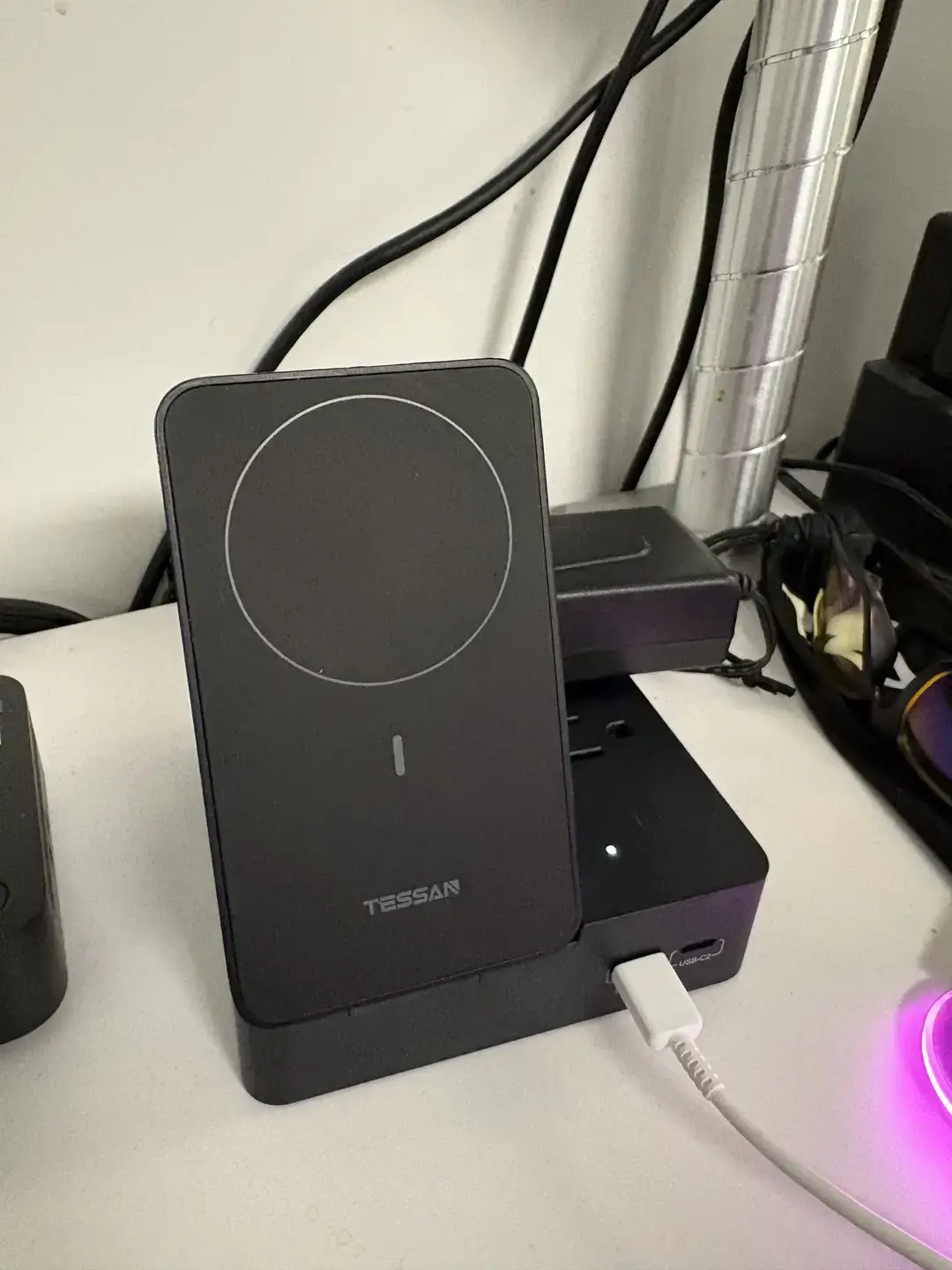
The two AC outlets are what make this more useful on a desk than a phone-and-watch dock. Plug one into a monitor and the other into a lamp. Then use the main USB-C port for the laptop and keep the other USB ports available for things you plug in as needed, like a tablet, headphones or an earbuds case. When you sit down, the phone stand is already where you expect it to be.
| Feature | Black 65W model |
|---|---|
| AC outlets | 2 |
| Wired charging | 2 USB-C ports and 1 USB-A port |
| Main USB-C output | Up to 65W with that port in use alone |
| Magnetic phone stand | Tilts from flat to 65°, with up to 15W on compatible devices |
| Apple Watch charging | Detachable module rated up to 5W |
| Base dimensions | 4.1 × 4.5 × 1.3 inches |
| Power cord | 6 ft, with a 0.32-inch-thick angled wall plug |
TESSAN’s current listing calls it a 7-in-1. The count includes the Apple Watch module alongside the five wired connections and the phone stand. If a listing uses “6-in-1,” check the model number and the photos for the watch module. The black 65W version on TESSAN’s site is TS-WR02US01-BK.

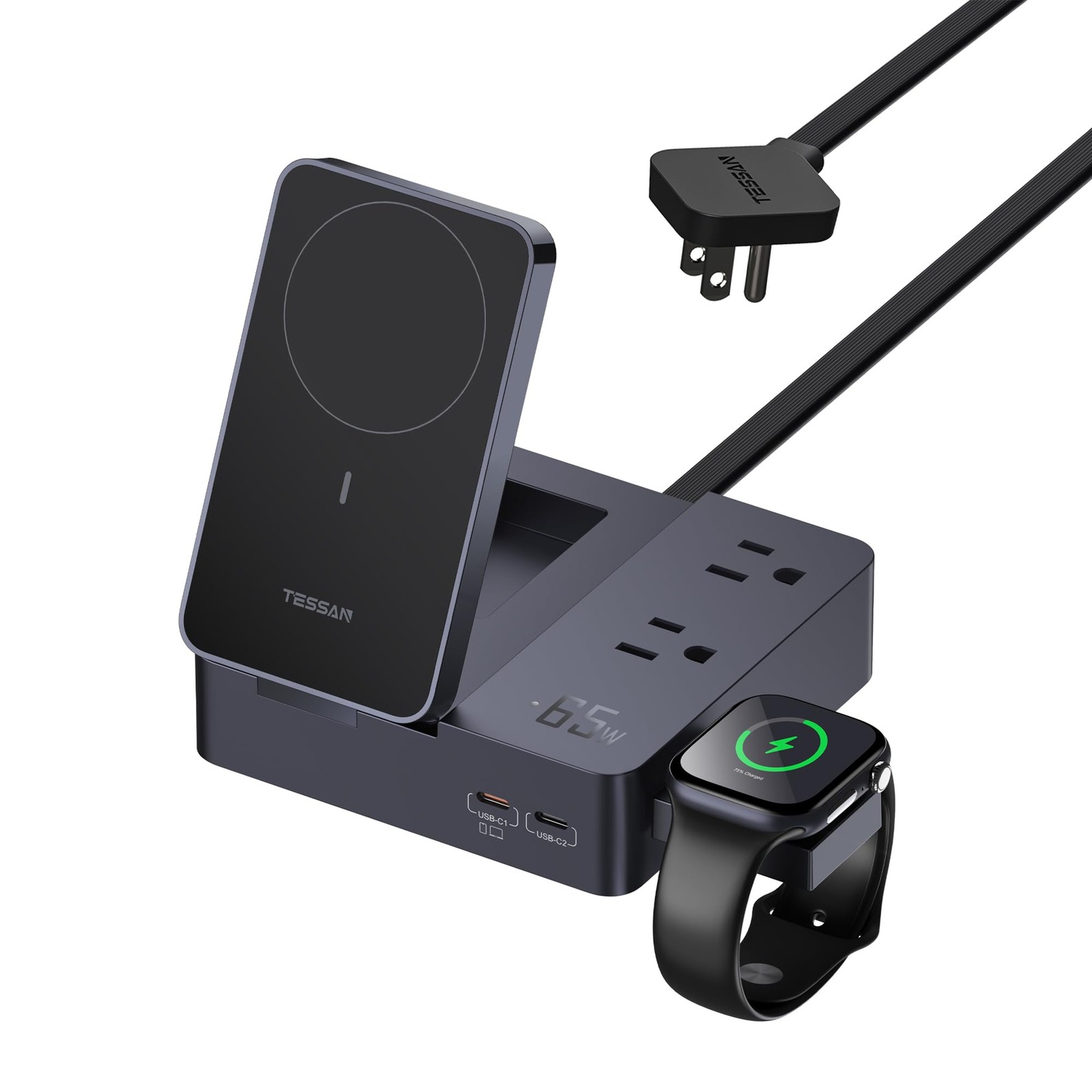
Magic 65W Charging Station USB Phone Charger with Wireless Charging
Can it replace your laptop charger?
Start with the wattage on your laptop’s current adapter and check whether the laptop accepts USB-C charging. If you already power it from a 65W USB-C adapter, the TESSAN is a reasonable candidate for your everyday desk cable. If your laptop normally uses a higher-wattage adapter, especially under sustained load, keep that adapter ready. The original brick can also take one of the two AC outlets if you want to use the TESSAN for everything else.
Think about what you tend to plug in at the same time. A laptop connected on its own can get the primary port’s full rated output if the laptop and cable support it. Add another charging device and the station shares the available power. TESSAN gives the single-port ceiling, so budget around shared output if your usual routine involves charging a laptop and tablet together. A separate adapter or a higher-wattage desktop charger makes more sense when sustained laptop power comes first.
The most useful check takes a minute. List the devices that stay plugged in, then add the ones you typically drop onto the desk after lunch or at the end of the day. If the laptop is the only device that regularly needs substantial wired power, this layout is easier to work with than it would be for two laptops sharing one station.
The magnetic phone stand is for a phone you keep using
If your phone sits on the desk for hours, the stand earns its space by keeping the screen visible. Tilt it up for a video call, glance at a timer while you work, or leave the screen in view while it tops up. At night, lay the stand flat if you prefer the phone out of your eyeline.
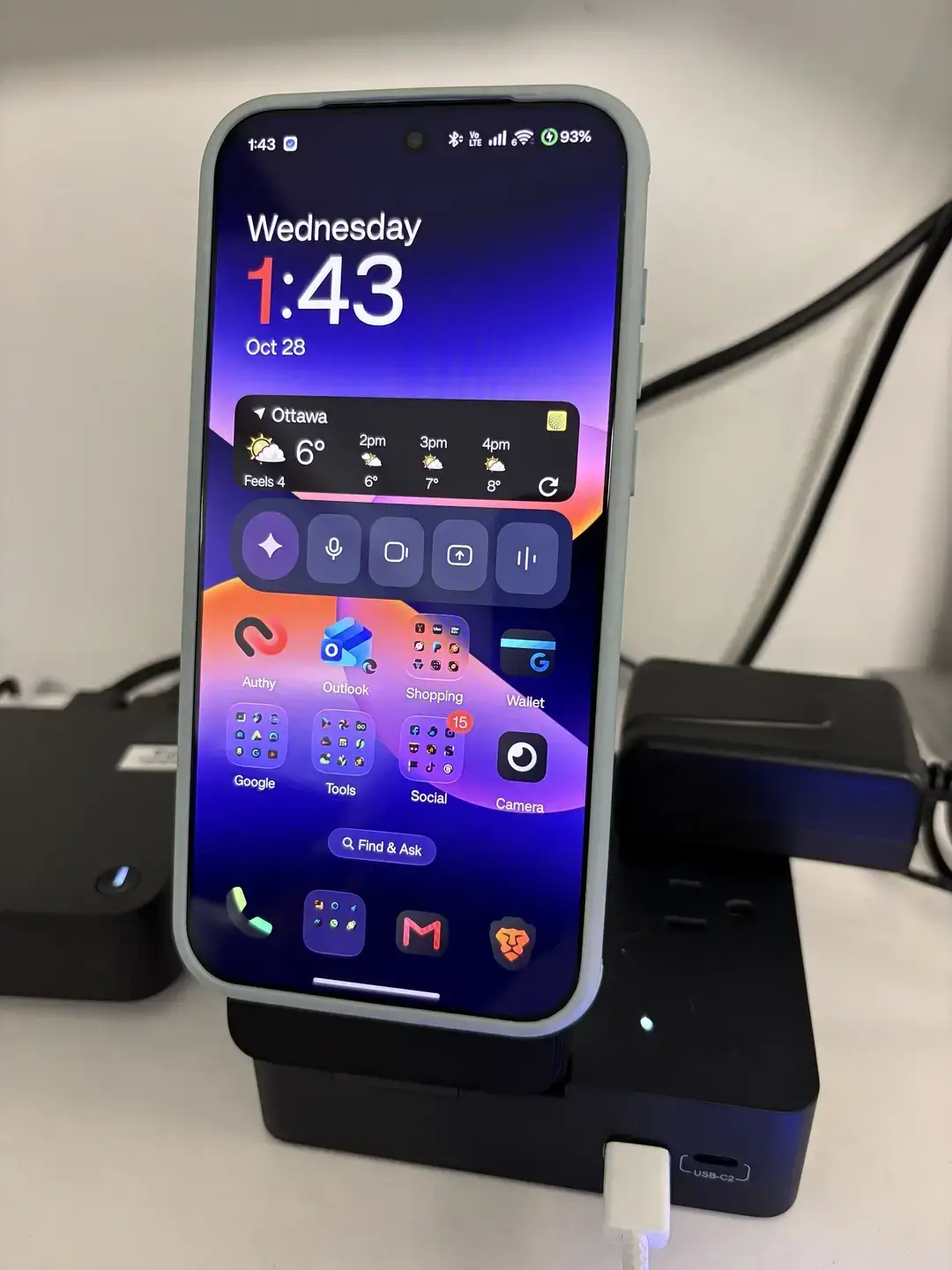
The wireless speed deserves a closer look. The stand is rated for up to 15W with compatible devices, but iPhone buyers should plan around 7.5W on this unit. That makes more sense for a phone that spends an afternoon on the desk than one you put down for a short top-up before heading out. If quicker iPhone charging is a priority, use a wired connection or look for a certified Qi2 charger that supports your model. For a portable example, see the INIU SnapGo Air Qi2 review.
With Android, check two things separately: whether the phone supports wireless charging and whether it will hold securely on the stand. A phone can charge when laid flat and still lack the magnetic grip to stay put when tilted. A compatible magnetic case may help with hold and alignment. It’s worth checking your exact phone-and-case combination before counting on the upright position every day.
The Apple Watch module and flat plug solve different annoyances.
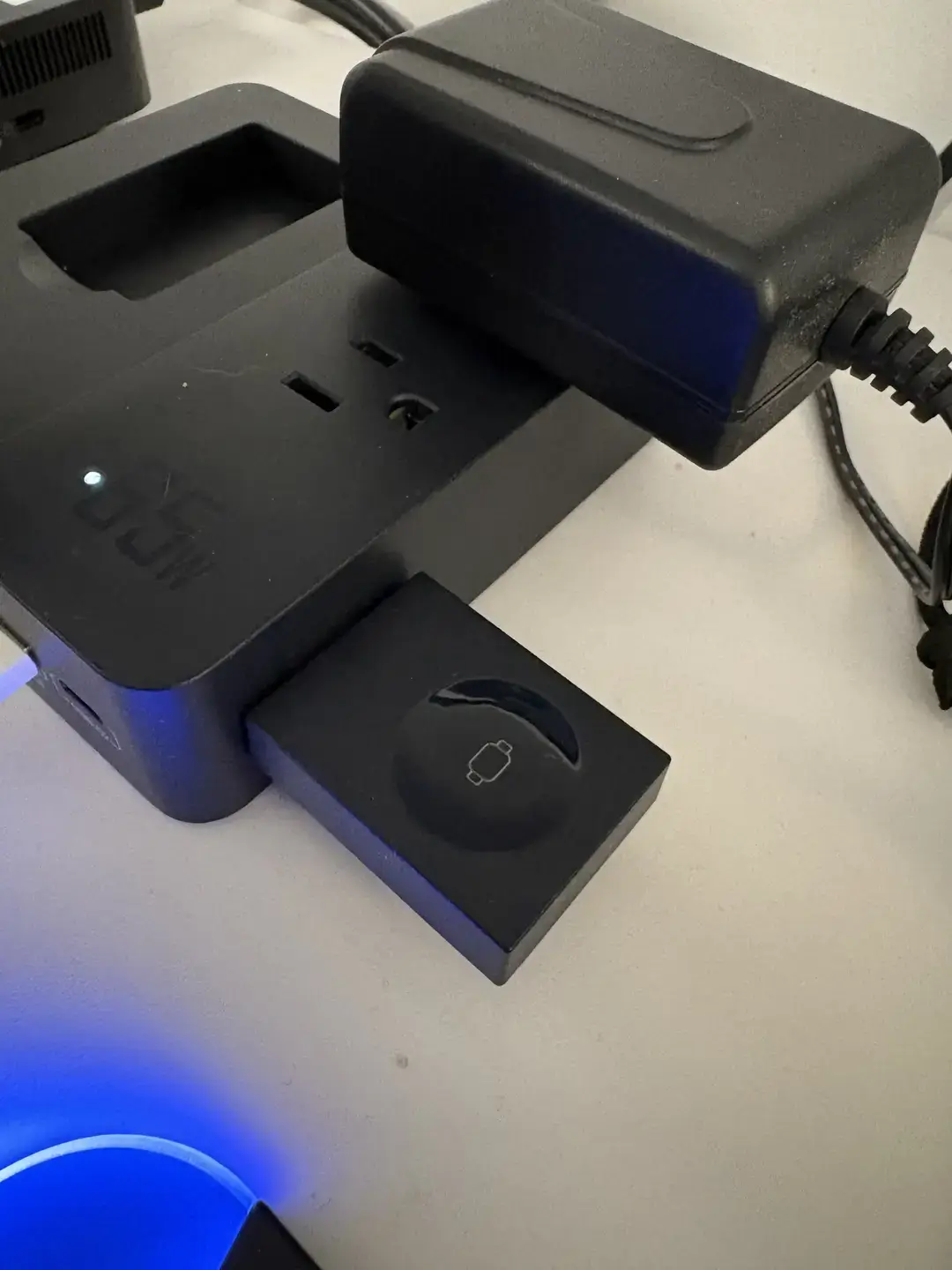
The detachable Apple Watch module gives your watch a regular place to charge without another cable crossing the desk. It’s rated up to 5W. If you use a Galaxy Watch, Garmin or another watch with its own charger, check that watch’s requirements and plan to use its original charging accessory. That still leaves you with the option of keeping the charger at the station.
The wall plug is worth a look even if you rarely touch the outlet. It’s 0.32 inches thick and exits at an angle, which is helpful when the socket sits behind a desk or nightstand. Check which way the cord will run and leave room at the station for the cords you’ll plug into it. The base is compact on paper, but a monitor cord, a laptop cable and a phone tilted toward you all affect where it makes sense to put it.
Which version should you buy?
Choose the black 65W model if the station will take over regular charging for a compatible USB-C laptop and you’ll also use its stand or AC outlets. For a school or work desk where other gear is still on the shopping list, see the 2026 student tech guide for more desktop power options.
The white 30W model makes more sense if it’ll mostly charge a phone, earbuds and a watch, with an occasional tablet on USB-C. The two models share the same layout, so the practical question is whether you need the extra wired power. For a setup centred on an iPhone and Apple Watch, a dedicated dock like the Nomad Base One Max is another format to consider if you can leave laptop and AC power elsewhere.
As a gift, check the recipient’s devices first. Someone with a USB-C laptop, an iPhone and an Apple Watch can use several features right away. If you’re shopping for someone whose desk is already set up the way they like it, the CRYOVEX tech holiday gift guide has other workspace gear to consider.
Frequently asked questions
Can it charge a laptop, a phone and an Apple Watch at the same time?
Yes. Connect the compatible laptop to the main USB-C port, place the compatible phone on the stand and dock the watch on its module. The laptop’s charging power can drop when other charging points are in use.
Can I charge two phones at once?
Yes. Put a compatible phone on the wireless stand and plug the other phone into a USB port with the right cable. You can also charge them both by cable if you prefer to keep the stand free.
Can I use both AC outlets while the USB ports are in use?
Yes. The AC outlets work independently from the USB charging ports. For example, you can keep a monitor and a lamp plugged in while charging a laptop over USB-C.
Can the magnetic stand charge an AirPods case?
Yes, if the case itself supports wireless charging. Lay the stand flat and position the case over the charging area. For a wired-only case, connect it to a USB port with the appropriate cable.
Does the charging station need a separate wall adapter?
The station plugs directly into the wall with its built-in power cord. The black 65W model is listed with a six-foot cord, so measure from the outlet to where you want the stand to sit, following the route the cord will actually take.
Can I use the stand flat?
Yes. It folds down to a flat position. That gives you a place to rest a phone that supports wireless charging but doesn’t stay securely attached when the stand is upright.
Verdict: Buy it for the devices you use in the same spot
The TESSAN Magic 65W makes the strongest case when three things are true: your laptop can charge over USB-C within its power limits, you’d use the phone stand often, and at least one desk accessory still needs a regular outlet. If that sounds like your desk, you can free up a wall socket or retire a few separate adapters while keeping the connections you actually use within reach.
Check price and availability for the TESSAN Magic 65W
Select Black/65W on the product page if laptop charging is part of your plan.